Conditions for displaying the filter

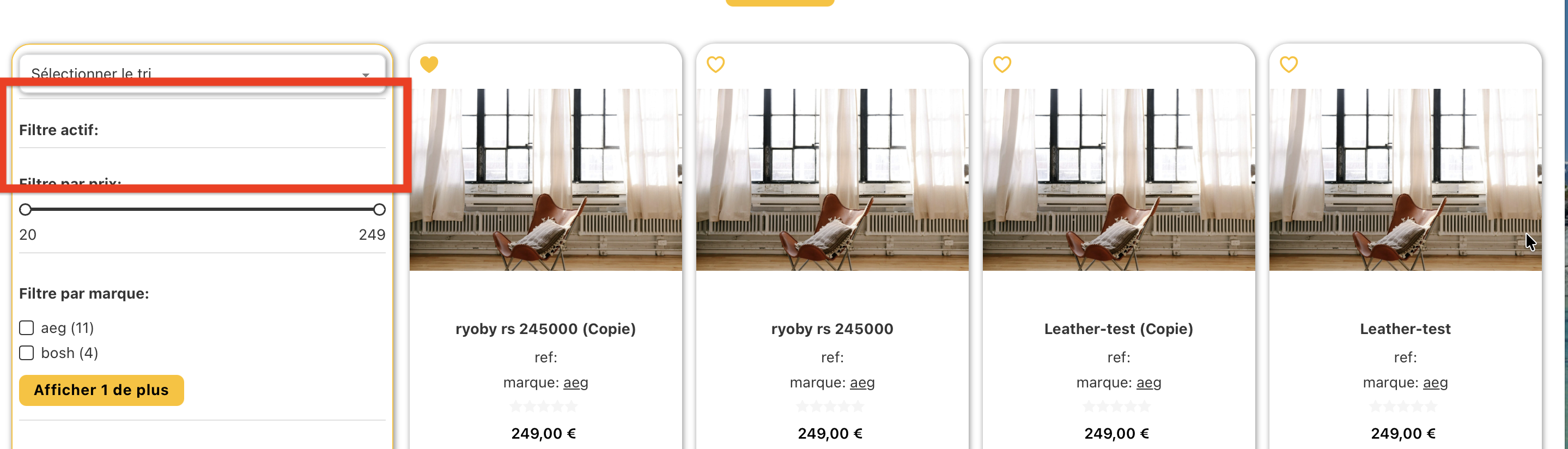
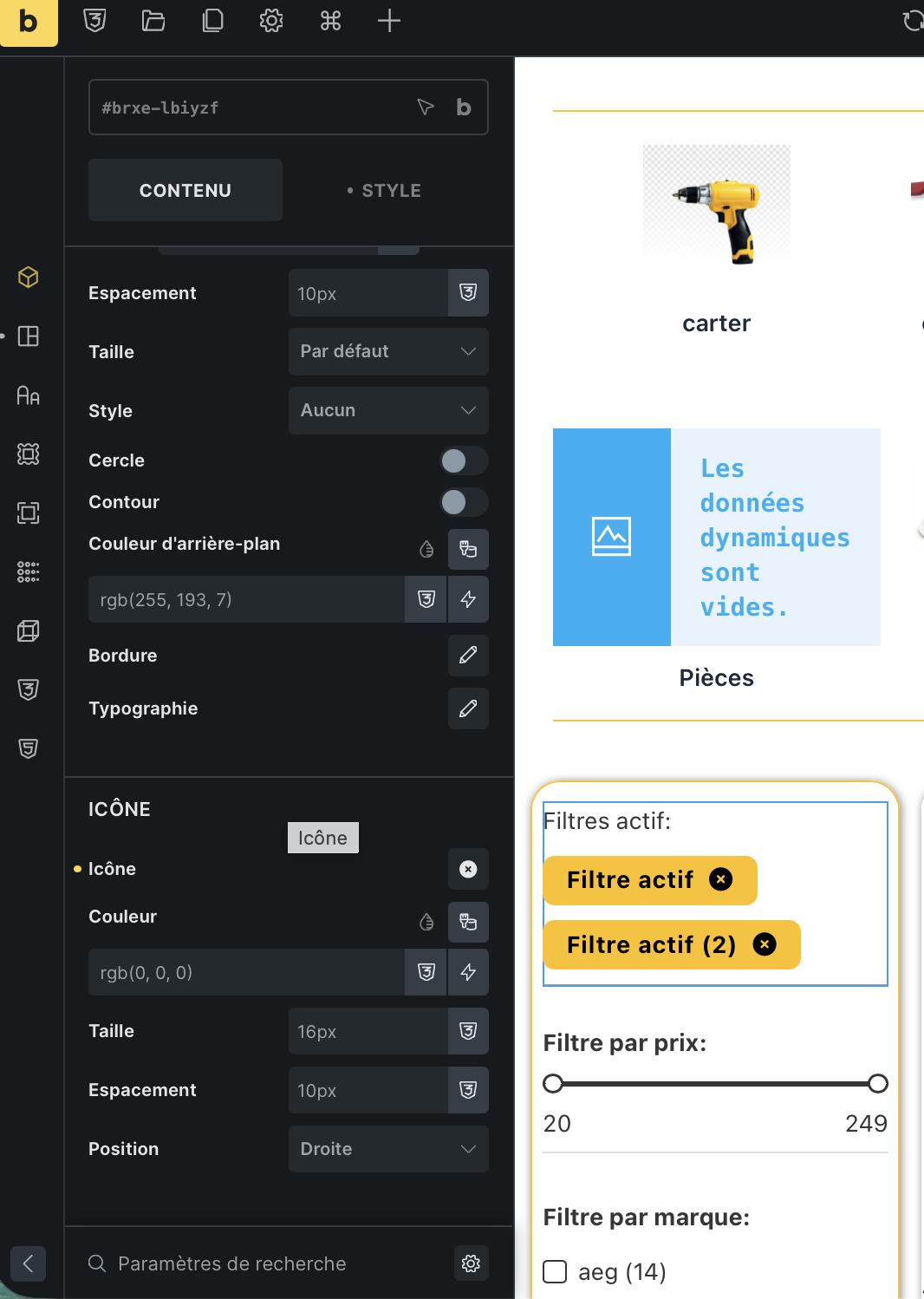
For a more flexible and convenient operation, there are not enough conditions so that we can dynamically configure the display or hiding of the filter if there are no values for it in the current record request. Currently, all filters with and without values are always displayed in the filter list.

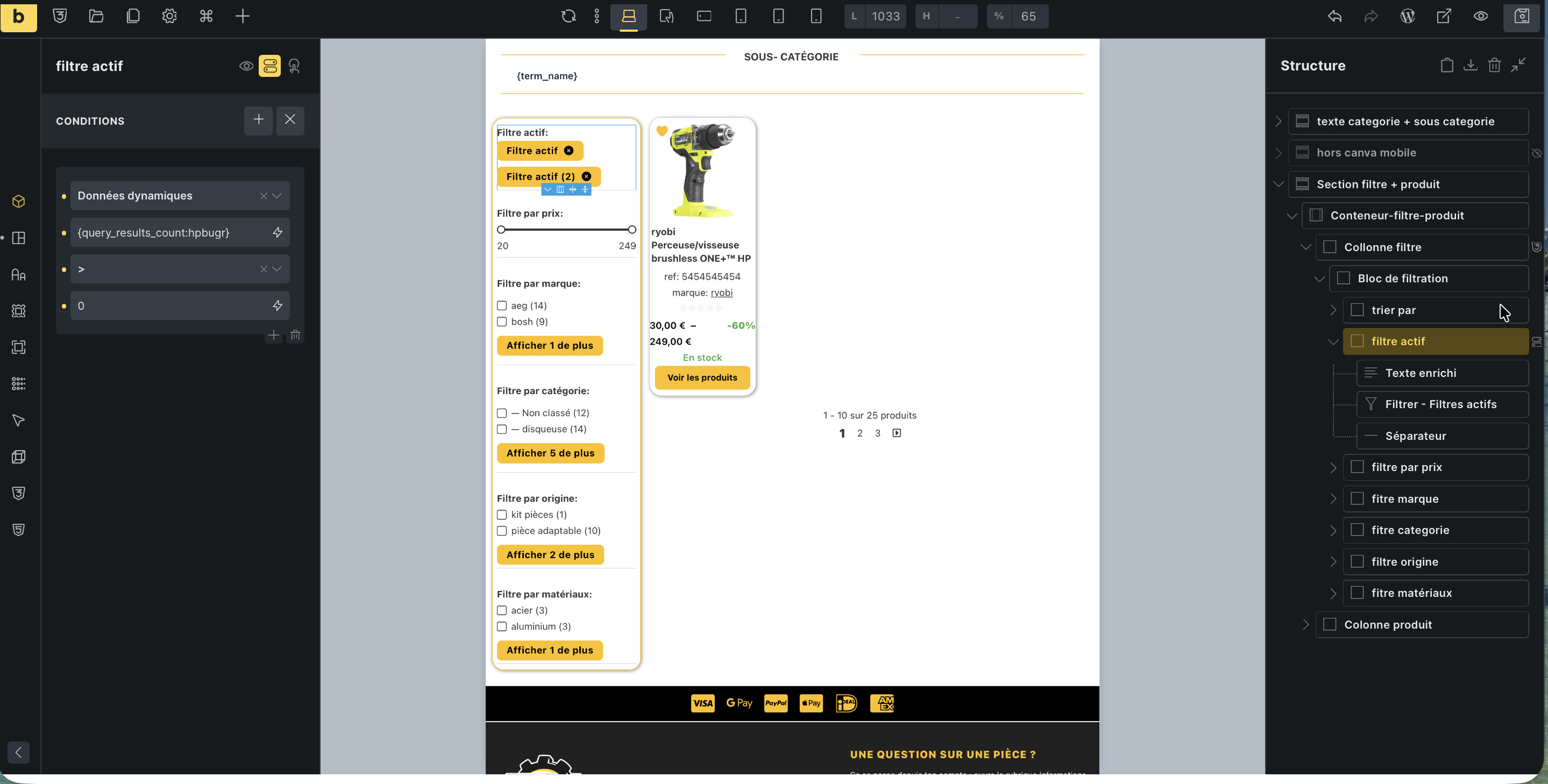
Screenshot_2

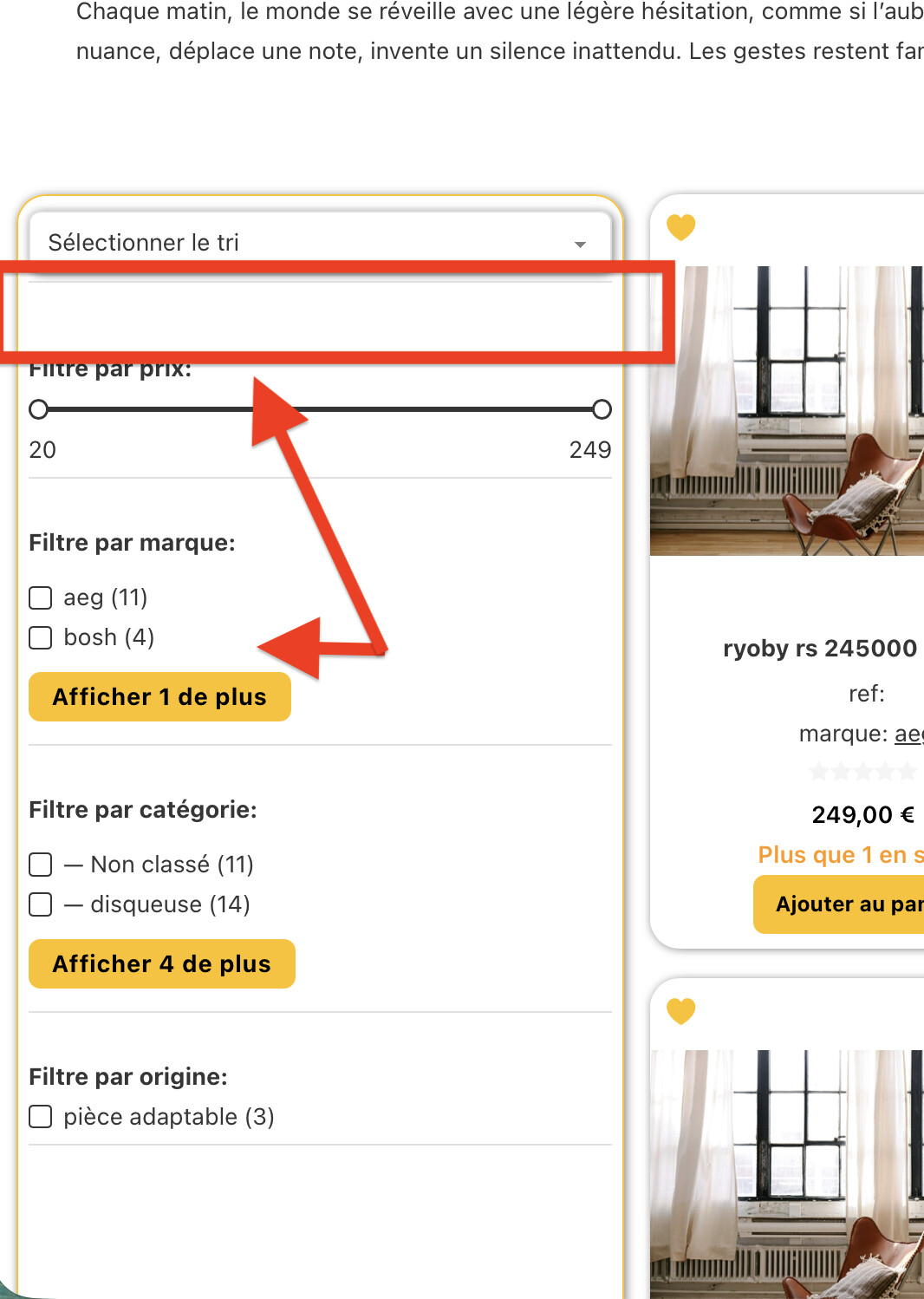
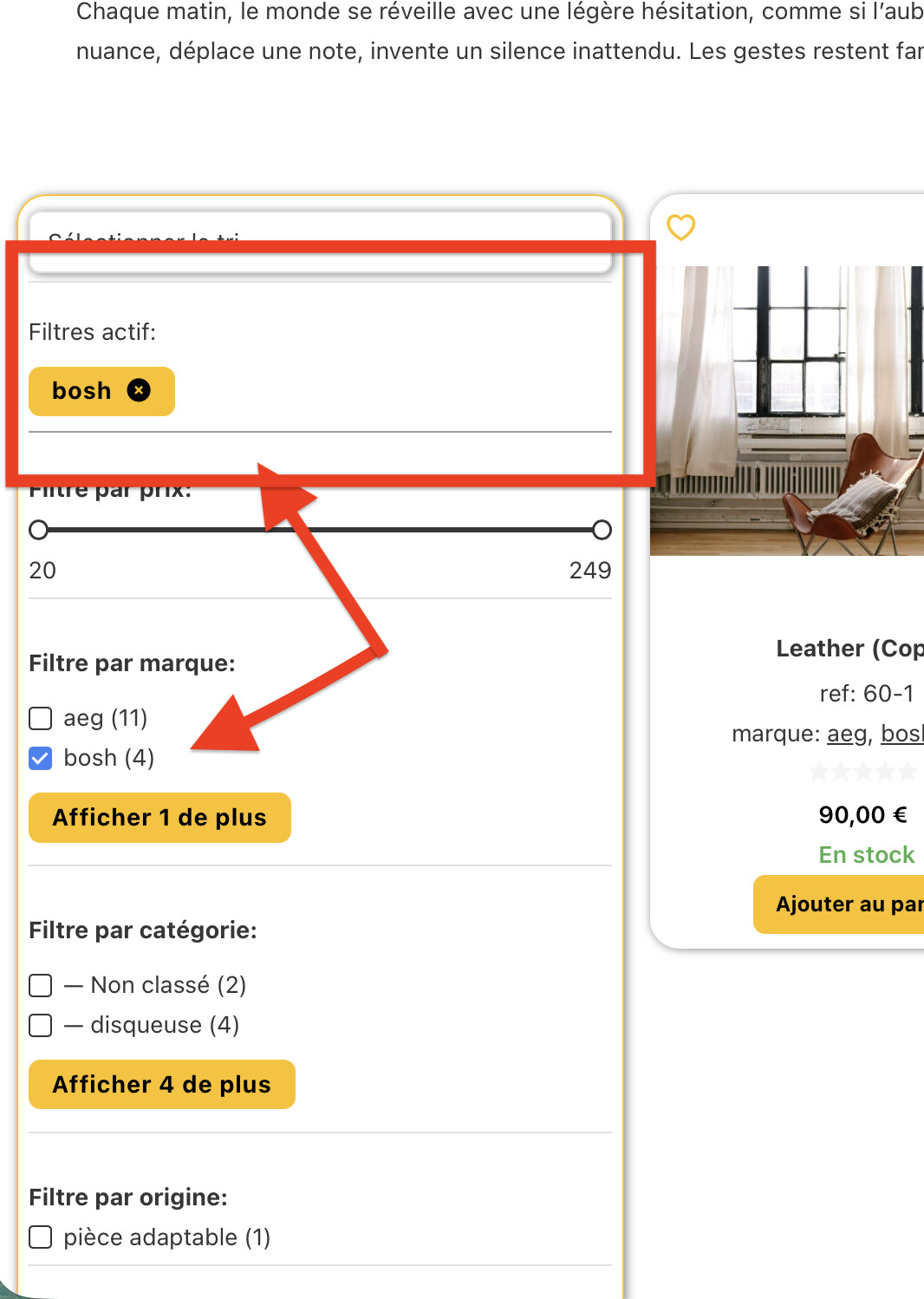
I’m currently having the same problem. How do I create a condition on a block that contains a title and a filter so that it doesn’t display if the filter is empty?

I have an active filter, and I’d like its title and separator to only be displayed when an active filter is present.
What would be really helpful is to add the ability to add a title to the filter, and when the “don’t display empty terms” option is selected, the filter (and its title) would be hidden.

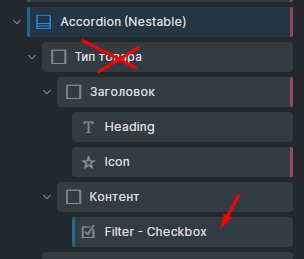
PS: I copied and pasted another condition just to take the picture; obviously, this condition doesn’t work.

Hi guys,
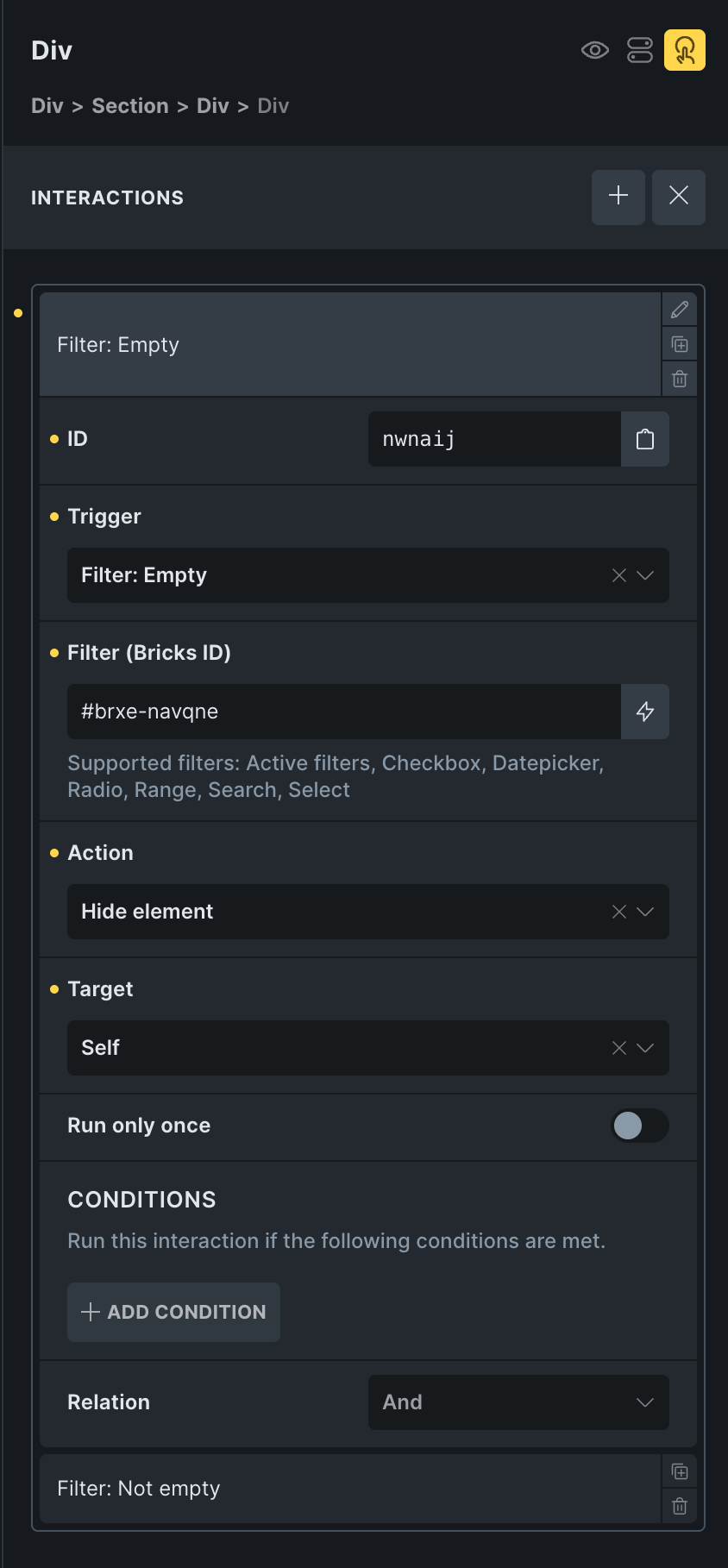
This isn’t possible with a condition, but you can use an interaction like this:
Filter empty: hide, filter not empty: show

CleanShot 2026-09-08 at 11.00.41@2x

Hi Timmse, I’m going to test your solution, which seems much simpler. On my end, I asked Claude Code to modify the element. Here’s my prompt:

“Is it possible to create a bricks element? I’d like to improve the “active filter” element. I’d like to be able to add a title to the active filter element, as well as a separator that would appear below the filter. Most importantly, I’d like the “hide empty elements” option to hide the title and the separator if the entire filter returns nothing.”

It would be useful to have this function on all filters, since they’re generally stacked one after the other.

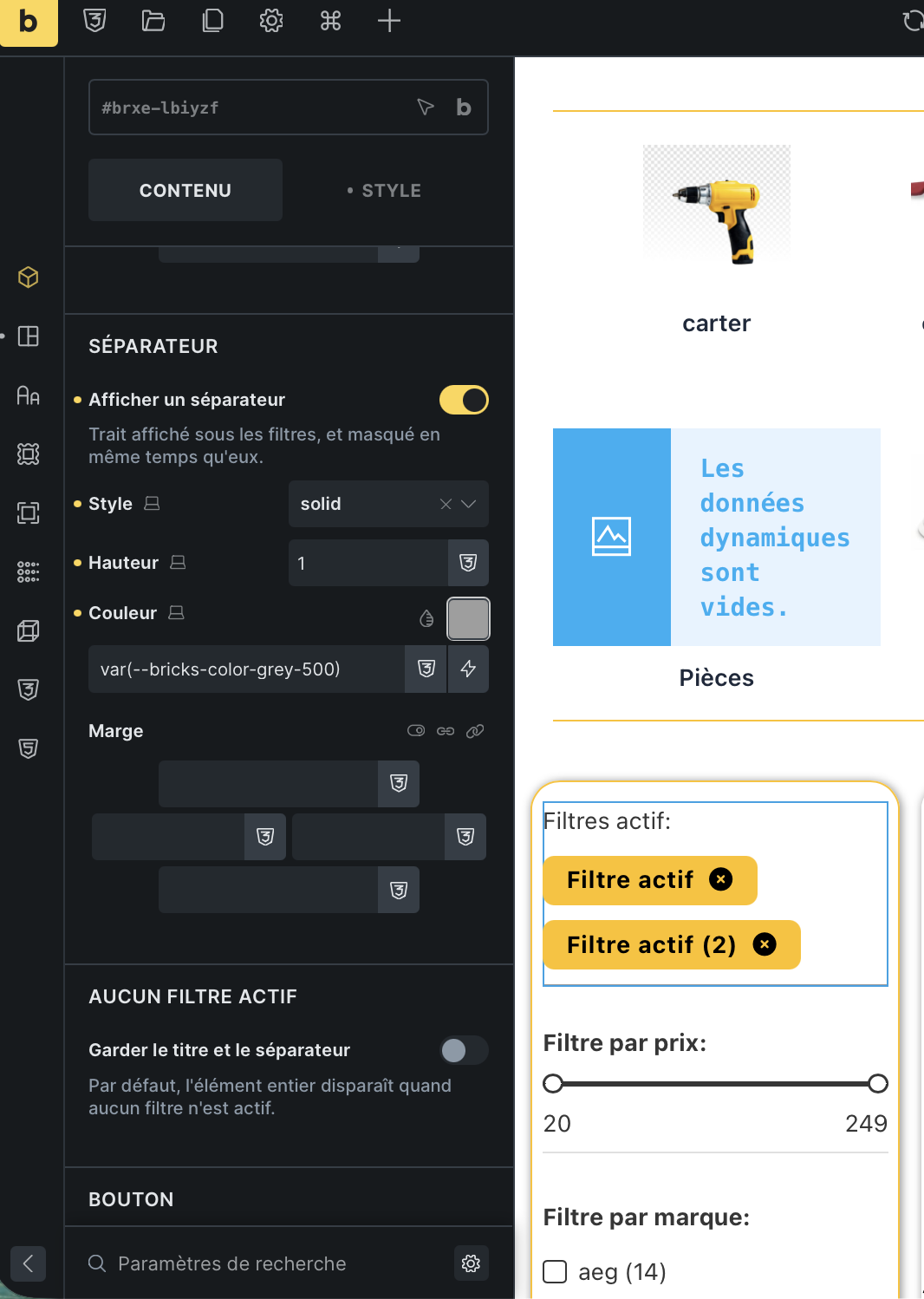
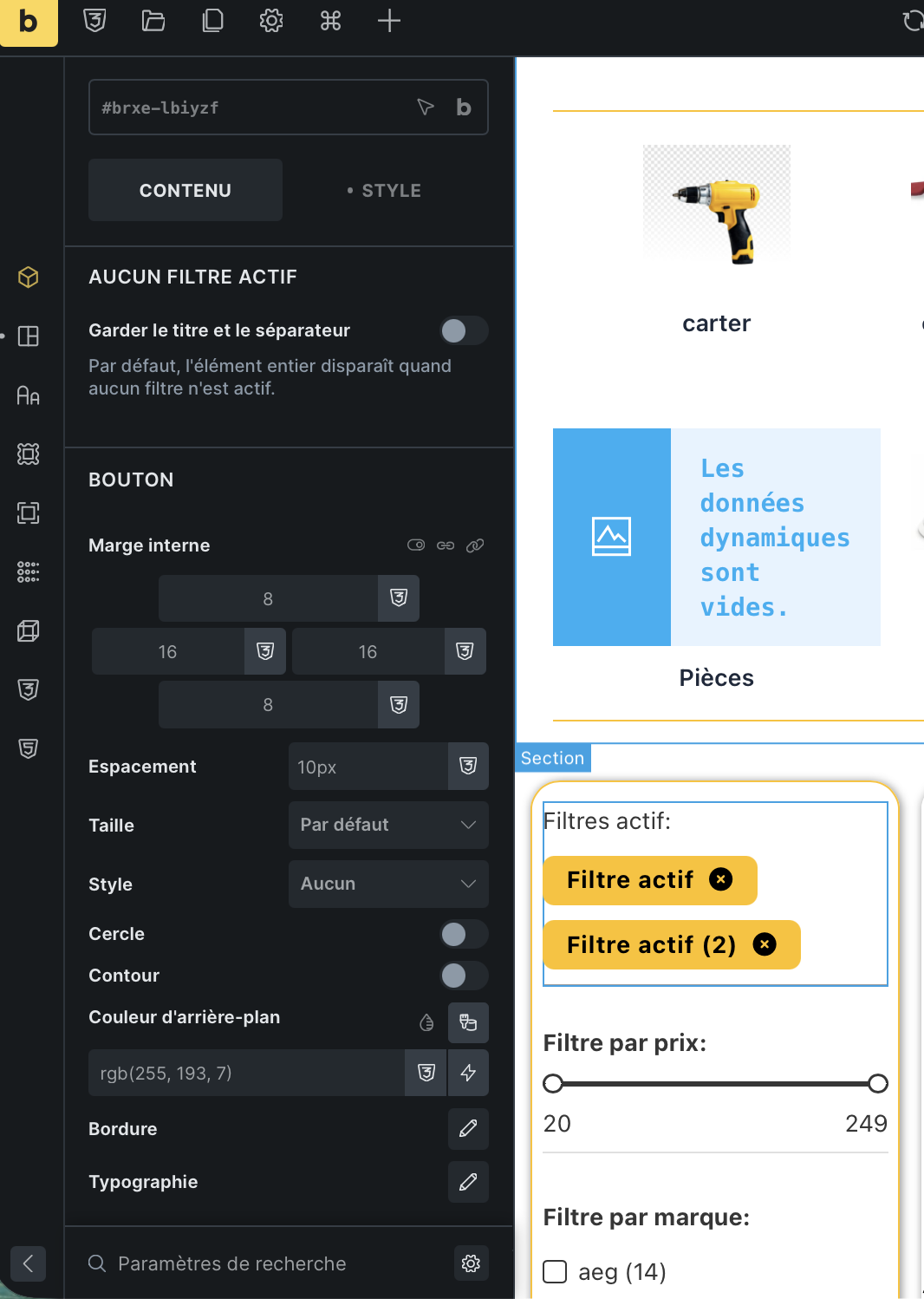
Adding a Title and a Separator to the “Active filters” element — and hiding them with it

TL;DR — I needed a heading and a rule around Bricks’ Filter → Active filters element that disappear together with the filters when nothing is active. Doing it with sibling elements leaves an orphan “Active filters:” heading and a stray divider on every unfiltered page load. So I extended the native element instead of building a new one, and the “hide when empty” costs zero JavaScript.

Posting the code plus the reasoning, because the interesting part isn’t the element — it’s the three Bricks internals that constrain how you’re allowed to write it.

Tested on Bricks 2.4-rc, WordPress 7.1, PHP 8.4, WooCommerce 11.1. All line numbers below are from 2.4-rc.


The problem

The usual layout is a wrapper block containing three siblings:

Block
├── Text     "Active filters:"
├── Filter - Active filters
└── Divider

Bricks core already ships .brxe-filter-active-filters:empty { display: none } in assets/css/frontend.min.css, so the filter element itself vanishes when there’s nothing to show. The Text and the Divider don’t. You get a heading over empty space and a floating rule, on every unfiltered page view.


Why I extended the native element instead of registering a new one

This was the first real decision, and it’s the one I’d get wrong if I hadn’t grepped first.

The string filter-active-filters is hardcoded in four places in Bricks 2.4-rc:

# Location What it gates
1 Query_Filters::filter_controls_elements() — includes/query-filters.php:864 Which elements in a page tree get written to the {prefix}bricks_filters_element table
2 Query_Filters::dynamic_update_elements() — includes/query-filters.php:932 Which elements get_updated_filters() re-renders into the AJAX response
3 The serialized-string map at includes/query-filters.php:785 ('filter-active-filters' => 's:21:"filter-active-filters"') The meta_query for a full filter re-index
4 assets/js/filters.js:2321 — selector .brxe-filter-active-filters[data-brx-filter] [data-filter-id] The clear-filter click handler

A brand-new element named my-active-filters renders as .brxe-my-active-filters and stores name: 'my-active-filters'. It gets skipped by all four: never registered as a filter element, never refreshed by AJAX, and its clear buttons are dead. I found no filter/hook in 2.4-rc that lets a differently-named element opt into those lists.

So: subclass the native element and keep its $name. Bricks\Elements::$elements is keyed by element name, and Elements::register_element() assigns self::$elements[$element_name] unconditionally — so registering under a name that’s already taken replaces the native entry rather than adding a second one to the panel.

The payoff is that nothing else has to change. Existing pages still store name: 'filter-active-filters', the root class stays brxe-filter-active-filters, indexing keeps working, and Frontend::render_element() resolves the class through Elements::$elements[$element_name]['class'] (includes/frontend.php), so the override is used for the AJAX re-render too, not just the initial page render.

Registration

add_action( 'init', function() {
	// Absent when Query Filters are disabled in Bricks > Settings.
	// Without this guard, `extends \Bricks\Filter_Active_Filters` is a fatal error.
	if ( ! class_exists( '\Bricks\Filter_Active_Filters' ) ) {
		return;
	}

	\Bricks\Elements::register_element(
		get_stylesheet_directory() . '/elements/filter-active-filters.php',
		'filter-active-filters',      // same name -> replaces the native element
		'ES_Filter_Active_Filters'
	);
}, 11 );

Two details worth knowing:

  • Priority 11. Bricks requires its native element class files from Elements::init_elements() → register_elements(), hooked on init at the default priority 10 (includes/elements.php:13). At 11 the parent class is declared, and Elements::load_elements() — which instantiates everything — hasn’t run yet, because it’s on the later wp hook (includes/elements.php:16).
  • Always pass $element_name and $element_class_name. With both omitted, register_element() falls back to end( get_declared_classes() ) and then instantiates the element purely to read $instance->label / ->description — which are dynamic properties assigned in Bricks\Element::__construct() (includes/elements/base.php:71). Passing them explicitly skips that and is deterministic no matter what else got autoloaded before you.

The gotcha that shapes everything: the AJAX replace contract

This is the part I’d want to know before writing any custom filter element.

bricksDisplayQueryResult() in assets/js/frontend.js refreshes each filter like this:

const dummyDiv = document.createElement('div')
dummyDiv.innerHTML = filterHtml
let newFilterElement = dummyDiv.childNodes[0]
// ...
filterInstance.filterElement.replaceWith(newFilterElement)

Two consequences:

1. The returned HTML must start with the element root. It takes childNodes[0], not firstElementChild. One stray leading newline and childNodes[0] is a text node — which then replaces your element in the DOM. (filterInstance.filterElement is the node carrying data-brx-filter, i.e. the root, as registered in assets/js/filters.js around line 748.)

2. render() must never echo an empty string. With filterHtml === '', dummyDiv.childNodes[0] is undefined, and Node.replaceWith(undefined) stringifies its argument per the DOM spec’s “convert nodes into a node” step — it injects a text node reading literally undefined into the page, and destroys the node the next refresh needs to find.

So “hide when empty” cannot be “render nothing”. It has to be “render an empty root and let CSS hide it”.

Which is exactly what core already does for you:

.brxe-filter-active-filters:empty { display: none }

Emptiness is expressed in the DOM rather than computed, so it survives every AJAX refresh with no event listener. That single fact is what made the whole feature cheap.


Where the title and separator go

Inside the root <ul>, as presentational <li> — not in a wrapper <div>.

A wrapper would satisfy the childNodes[0] rule fine. What it wouldn’t survive is everything already styled on existing instances: changing the root tag silently re-targets flex-direction, gap, align-self, and the inherited buttonGap control whose css selector is '', i.e. the root. Keeping the <ul> means every already-built page renders pixel-identically after you drop this in.

It also keeps Bricks’ own Filter: Empty / Not empty interaction triggers working. For filterType === 'active-filters', bricksFilterOptionsInteractions() in assets/js/filters.js computes emptiness as:

totalOptions = filter.filterElement.innerHTML

An implementation that always rendered a title inside the root would report “not empty” forever and quietly break that native feature. Rendering nothing at all when empty keeps it honest.

Output:

<ul class="brxe-filter-active-filters" data-brx-filter="...">
  <li class="brx-af-title" role="presentation"><h4>Active filters</h4></li>
  <li><button aria-label="Clear filter: aeg" ...>aeg</button></li>
  <li class="brx-af-separator" role="presentation" aria-hidden="true"></li>
</ul>

On the accessibility trade-off, honestly: role="presentation" strips the listitem semantics from the <li>, and it is not inherited by the heading — listitem has no required owned elements, so the <h4> is still exposed and announced as a heading. The separator is purely decorative, so it’s aria-hidden="true" and gone from the tree entirely. That said, a heading in a wrapper outside the list would be cleaner semantics. I traded that away for the AJAX root constraint above, and I think it’s the right trade — but it is a trade, and if someone has a better markup that satisfies childNodes[0], I’d genuinely like to see it.


Why render() buffers parent::render()

Bricks\Filter_Active_Filters::get_item() is private, so a subclass can’t reuse it. Re-implementing render() means copying ~150 lines of label resolution — range formatting, datepicker display formats, custom label mapping, sort and per-page options — and re-copying it on every Bricks update. Buffering the parent and splicing two <li> in is far less to maintain:

public function render() {
	ob_start();
	try {
		parent::render();
	} finally {
		$html = ob_get_clean();
	}

	if ( ! preg_match( '#^(<ul\b[^>]*>)(.*)(</ul>)$#s', $html, $matches ) ) {
		echo $html;   // builder placeholder, or empty on the frontend: pass through
		return;
	}

	list( , $open_tag, $items, $close_tag ) = $matches;
	$has_items = trim( $items ) !== '';

	if ( ! $has_items && ! isset( $this->settings['afShowWhenEmpty'] ) ) {
		echo $open_tag . $close_tag;   // strictly empty root -> :empty hides it
		return;
	}

	echo $open_tag . $this->render_af_title() . $items . $this->render_af_separator() . $close_tag;
}

Yes, it’s a regex over HTML. Here’s why it’s safe for this specific string:

  • Element::render_attributes() escapes attribute values with esc_attr(), so a raw > cannot appear inside the root tag and [^>]* can’t stop early on the JSON in data-brx-filter;
  • the native render loop does $label = esc_attr( $item['label'] ) (includes/elements/filter-active-filters.php:336), so < is already entity-encoded in the items — and even if it weren’t, the greedy .* binds to the last </ul>, which is the real closing tag.

And the failure mode is benign: if a future Bricks release changes the parent’s output shape, the regex stops matching and the element passes the native output through unchanged. It degrades to stock behaviour instead of breaking.

Note the echo has no whitespace between the parts. Both :empty and childNodes[0] depend on that.


Controls

Added right after the native excludeIds control (rather than appended, so they don’t end up buried under the Icon section):

  • Title — text with hasDynamicData, HTML tag (whitelisted), typography, margin
  • Separator — checkbox, style, height, color, margin
  • No active filter — checkbox “Keep title and separator”

The empty behaviour is inverted deliberately: the checkbox is off by default, so the whole element disappears when nothing is active. A 'default' => true checkbox doesn’t work here, because Bricks removes the key from settings when you untick it — so a default-on checkbox can’t be turned off. Inverting the label solves it and matches the native :empty behaviour.

Gating a control behind a checkbox uses 'required' => [ 'afSeparator', '=', true ], which is the idiomatic core form — see post-toc.php:79, shortcode.php:33, search.php:188.


Alternatives I considered

Worth listing, because for a one-off two of these are genuinely better than writing PHP:

Approach Verdict
CSS :has() — .wrapper:has(> .brxe-filter-active-filters:empty) { display: none } on the wrapper block Works today, zero PHP, no flash. Use this if you just need it once. Downsides: needs a class on the wrapper, the title stays a separate element, no builder controls.
Native interaction — trigger Filter: Empty / Not empty, action hide/show Works with no code at all. Downside: JS-driven, so there’s a paint before it applies on load, and it’s one interaction to wire per block.
bricks/elements/filter-active-filters/controls filter (base.php:154) Adds controls to a native element without subclassing — great when controls are all you need. Doesn’t let you change render().
A brand-new element Breaks all four coupling points above. Don’t.

The subclass earns its keep when you want it repeatable across many instances with builder controls. Arguably this belongs in core as a native option, and I’d be happy to see this thread turn into that feature request.


Caveats before you paste this

  • Versions. Everything cited is from 2.4-rc. The element itself exists since 1.11 (query-filters.php:941). I did not test older releases — if you’re on one, re-check the four coupling points and the childNodes[0] line in frontend.js before relying on this.
  • Rename the class. ES_Filter_Active_Filters is in the global namespace. Use your own prefix.
  • i18n. Labels that reuse a string Bricks already ships (Title, Typography, Margin, Color, Style, Height, Separator) get translated for free. The custom ones won’t — swap in your own text domain and ship a .po if you need them localized.
  • Stylesheet position. Element::enqueue_scripts() is called from Element::init() right before render (base.php:2949) and from Elements::load_element() when bricks_is_builder_iframe() (elements.php:380) — so it loads on the frontend and the builder canvas, only on pages that use the element. In my tests the <link> landed in <head>; if it ends up in your footer, wp_register_style() the handle on wp_enqueue_scripts and reduce the element method to wp_enqueue_style( 'handle' ).
  • Reverting is clean. Delete the two files and the add_action block. Pages keep working: the extra settings keys (afTitle, afSeparator, …) are simply ignored by the native element, and the title and rule disappear. Nothing in the database needs undoing.
  • On Bricks updates, the risk is concentrated in exactly one place — the shape of the parent’s output — and, as noted above, a mismatch degrades to native rendering rather than a fatal.

The technique generalises

Nothing here is specific to active filters. Subclass a native element, keep its $name, re-register it on init priority 11 works for any Bricks element, and it’s much safer than a fresh element whenever core references that element by name. The three hooks to know, from lightest to heaviest:

  1. bricks/elements/{name}/controls (base.php:154) — add controls, no subclass.
  2. bricks/element/settings (base.php:3042) — rewrite settings immediately before render(). Excellent for testing an option from a mu-plugin without touching saved page data, which is how I verified all of this without editing my templates.
  3. Subclass + ob_start(); parent::render(); — when the helpers you need are private on the native class.

Files attached: filter-active-filters.php (element), filter-active-filters.css (stylesheet), functions-snippet.php (registration). Feedback welcome, especially on the markup trade-off.
php:

<?php
if ( ! defined( 'ABSPATH' ) ) exit;

/**
 * Bricks "Filter - Active filters" element, extended with a Title and a Separator
 * that are hidden together with the filters when nothing is active.
 *
 * Tested on Bricks 2.4-rc / WordPress 7.1 / PHP 8.4 / WooCommerce 11.1.
 *
 * ---------------------------------------------------------------------------
 * WHY THIS SUBCLASSES THE NATIVE ELEMENT INSTEAD OF ADDING A NEW ONE
 * ---------------------------------------------------------------------------
 * This class keeps the native $name ('filter-active-filters', inherited from the
 * parent). Bricks\Elements::$elements is keyed by element NAME and
 * Elements::register_element() assigns self::$elements[ $element_name ]
 * unconditionally, so registering this class under the same name REPLACES the
 * native registration instead of adding a second element to the panel.
 *
 * That matters, because the string 'filter-active-filters' is hardcoded in four
 * places in Bricks 2.4-rc:
 *
 *   1. Query_Filters::filter_controls_elements()   (includes/query-filters.php:864)
 *      -> the list that decides which elements in a page tree get written to the
 *         {prefix}bricks_filters_element table.
 *   2. Query_Filters::dynamic_update_elements()    (includes/query-filters.php:932)
 *      -> the list Query_Filters::get_updated_filters() checks before re-rendering
 *         an element into the AJAX response.
 *   3. The serialized-string map used to build the re-index meta_query
 *      ('filter-active-filters' => 's:21:"filter-active-filters"', :785).
 *   4. The frontend click handler, bound with the CSS selector
 *      '.brxe-filter-active-filters[data-brx-filter] [data-filter-id]'
 *      (assets/js/filters.js:2321), i.e. it depends on brxe-<element name>.
 *
 * A brand-new element named, say, 'my-active-filters' would render as
 * .brxe-my-active-filters and be skipped by all four: not registered as a filter
 * element, never refreshed by AJAX, and its clear buttons dead. Reusing the name
 * sidesteps all of it, and existing pages keep working untouched because the saved
 * element data still says name: 'filter-active-filters'.
 *
 * ---------------------------------------------------------------------------
 * WHY TITLE AND SEPARATOR ARE <li> INSIDE THE ROOT <ul>, NOT A WRAPPER <div>
 * ---------------------------------------------------------------------------
 * Two hard constraints, both coming from how Bricks refreshes filters over AJAX.
 *
 * (a) bricksDisplayQueryResult() in assets/js/frontend.js updates each filter with:
 *
 *         const dummyDiv = document.createElement('div')
 *         dummyDiv.innerHTML = filterHtml
 *         let newFilterElement = dummyDiv.childNodes[0]
 *         ...
 *         filterInstance.filterElement.replaceWith(newFilterElement)
 *
 *     It takes childNodes[0], NOT firstElementChild. So the HTML this element
 *     echoes must START with the element root - one stray leading newline and
 *     childNodes[0] is a text node, which then replaces the element in the DOM.
 *     A wrapper <div> would satisfy that, but it would also change the root tag
 *     and silently re-target every style already set on existing instances
 *     (flex-direction, gap, align-self, the inherited buttonGap control whose
 *     css selector is '' i.e. the root). Keeping the <ul> as root keeps every
 *     saved page pixel-identical.
 *
 * (b) render() must NEVER echo an empty string. With filterHtml === '',
 *     dummyDiv.childNodes[0] is undefined, and Node.replaceWith(undefined)
 *     stringifies its argument per the DOM spec's "convert nodes into a node"
 *     step - it would inject a text node reading literally "undefined" into the
 *     page, and destroy the node the next refresh needs to find. So "hide when
 *     empty" is done by echoing a strictly EMPTY root and letting CSS hide it.
 *
 * Bricks already ships `.brxe-filter-active-filters:empty { display: none }` in
 * assets/css/frontend.min.css, so an active-filters element that renders no
 * children disappears on its own - no JS, and it survives every AJAX refresh for
 * free. That is the whole trick: emptiness is expressed in the DOM, not computed.
 *
 * It also keeps Bricks' own "Filter: Empty / Not empty" interaction triggers
 * working. For filterType 'active-filters', bricksFilterOptionsInteractions()
 * (assets/js/filters.js) tests `filter.filterElement.innerHTML` for truthiness -
 * so an implementation that always rendered a title inside the root would report
 * "not empty" forever and quietly break that native feature.
 *
 * ---------------------------------------------------------------------------
 * WHY render() BUFFERS parent::render() INSTEAD OF REIMPLEMENTING IT
 * ---------------------------------------------------------------------------
 * Bricks\Filter_Active_Filters::get_item() is declared private, so a subclass
 * cannot reuse it. Re-implementing render() would mean copying ~150 lines of
 * label resolution (range formatting, datepicker display formats, custom label
 * mapping, sort/per-page options) and re-copying it on every Bricks update.
 * Buffering the parent and splicing two <li> in is far less code to maintain.
 *
 * @author  Antoine Belleville
 * @license GPL-2.0-or-later
 */
class ES_Filter_Active_Filters extends \Bricks\Filter_Active_Filters {

	/**
	 * Allowed HTML tags for the title. Whitelisted, never echoed from raw input.
	 */
	const TITLE_TAGS = [ 'div', 'p', 'span', 'h2', 'h3', 'h4', 'h5', 'h6' ];

	/**
	 * Element::enqueue_scripts() is called from Element::init() right before the
	 * element renders (includes/elements/base.php:2949) and from
	 * Elements::load_element() when bricks_is_builder_iframe()
	 * (includes/elements.php:380). So this loads on the frontend AND on the
	 * builder canvas, and only on pages that actually use the element.
	 *
	 * In my tests the <link> landed in <head>. If it ends up in your footer,
	 * wp_register_style() the handle on 'wp_enqueue_scripts' and reduce this to
	 * wp_enqueue_style( 'es-filter-active-filters' ).
	 */
	public function enqueue_scripts() {
		$dir  = get_stylesheet_directory();
		$uri  = get_stylesheet_directory_uri();
		$file = '/assets/filter-active-filters.css';

		if ( ! file_exists( $dir . $file ) ) {
			return;
		}

		wp_enqueue_style( 'es-filter-active-filters', $uri . $file, [], filemtime( $dir . $file ) );
	}

	/**
	 * Note on i18n: labels that reuse a string Bricks already ships (Title,
	 * Typography, Margin, Color, Style, Height, Separator) get translated for
	 * free. The custom ones below will not - swap in your own text domain and
	 * ship your own .po if you need them localized.
	 */
	public function set_controls() {
		parent::set_controls();

		$controls = [];

		// ---- TITLE ----------------------------------------------------------
		$controls['afTitleSep'] = [
			'label' => esc_html__( 'Title', 'bricks' ),
			'type'  => 'separator',
		];

		$controls['afTitle'] = [
			'label'          => esc_html__( 'Title', 'bricks' ),
			'type'           => 'text',
			'hasDynamicData' => 'text',
			'placeholder'    => esc_html__( 'Active filters', 'bricks' ),
			'description'    => esc_html__( 'Rendered above the filters, and hidden together with them.', 'bricks' ),
		];

		$controls['afTitleTag'] = [
			'label'       => esc_html__( 'HTML tag', 'bricks' ),
			'type'        => 'select',
			'options'     => array_combine( self::TITLE_TAGS, self::TITLE_TAGS ),
			'inline'      => true,
			'placeholder' => 'div',
			'required'    => [ 'afTitle', '!=', '' ],
		];

		$controls['afTitleTypography'] = [
			'label'    => esc_html__( 'Typography', 'bricks' ),
			'type'     => 'typography',
			'css'      => [
				[
					'property' => 'typography',
					'selector' => '.brx-af-title',
				],
			],
			'required' => [ 'afTitle', '!=', '' ],
		];

		$controls['afTitleMargin'] = [
			'label'    => esc_html__( 'Margin', 'bricks' ),
			'type'     => 'spacing',
			'css'      => [
				[
					'property' => 'margin',
					'selector' => '.brx-af-title',
				],
			],
			'required' => [ 'afTitle', '!=', '' ],
		];

		// ---- SEPARATOR ------------------------------------------------------
		$controls['afSeparatorSep'] = [
			'label' => esc_html__( 'Separator', 'bricks' ),
			'type'  => 'separator',
		];

		// [ key, '=', true ] is the idiomatic core form for gating a control
		// behind a checkbox: see post-toc.php:79, shortcode.php:33, search.php:188.
		$controls['afSeparator'] = [
			'label'       => esc_html__( 'Show separator', 'bricks' ),
			'type'        => 'checkbox',
			'description' => esc_html__( 'Rule rendered below the filters, and hidden together with them.', 'bricks' ),
		];

		$controls['afSeparatorStyle'] = [
			'label'       => esc_html__( 'Style', 'bricks' ),
			'type'        => 'select',
			'options'     => [
				'solid'  => 'solid',
				'dashed' => 'dashed',
				'dotted' => 'dotted',
				'double' => 'double',
			],
			'inline'      => true,
			'placeholder' => 'solid',
			'css'         => [
				[
					'property' => 'border-top-style',
					'selector' => '.brx-af-separator',
				],
			],
			'required'    => [ 'afSeparator', '=', true ],
		];

		$controls['afSeparatorHeight'] = [
			'label'       => esc_html__( 'Height', 'bricks' ),
			'type'        => 'number',
			'units'       => true,
			'placeholder' => '1px',
			'css'         => [
				[
					'property' => 'border-top-width',
					'selector' => '.brx-af-separator',
				],
			],
			'required'    => [ 'afSeparator', '=', true ],
		];

		$controls['afSeparatorColor'] = [
			'label'    => esc_html__( 'Color', 'bricks' ),
			'type'     => 'color',
			'css'      => [
				[
					'property' => 'border-top-color',
					'selector' => '.brx-af-separator',
				],
			],
			'required' => [ 'afSeparator', '=', true ],
		];

		$controls['afSeparatorMargin'] = [
			'label'    => esc_html__( 'Margin', 'bricks' ),
			'type'     => 'spacing',
			'css'      => [
				[
					'property' => 'margin',
					'selector' => '.brx-af-separator',
				],
			],
			'required' => [ 'afSeparator', '=', true ],
		];

		// ---- NO ACTIVE FILTER -----------------------------------------------
		$controls['afEmptySep'] = [
			'label' => esc_html__( 'No active filter', 'bricks' ),
			'type'  => 'separator',
		];

		$controls['afShowWhenEmpty'] = [
			'label'       => esc_html__( 'Keep title and separator', 'bricks' ),
			'type'        => 'checkbox',
			'description' => esc_html__( 'By default the whole element disappears when no filter is active.', 'bricks' ),
		];

		// Insert right after the native 'excludeIds' control rather than appending,
		// so the new controls do not end up buried below the Icon section.
		$this->controls = self::insert_controls_after( $this->controls, 'excludeIds', $controls );
	}

	public function render() {
		ob_start();

		try {
			parent::render();
		} finally {
			$html = ob_get_clean();
		}

		/**
		 * Not our <ul>: either the builder placeholder ("No target query selected")
		 * or an empty string, because render_element_placeholder() is final and
		 * returns early when $this->is_frontend (base.php:1807). Pass it through.
		 *
		 * The regex is safe against filter values for two reasons:
		 *  - Element::render_attributes() escapes attribute values with esc_attr(),
		 *    so a raw '>' cannot appear inside the root tag and [^>]* cannot stop
		 *    early on the JSON in data-brx-filter;
		 *  - the native render loop does $label = esc_attr( $item['label'] )
		 *    (filter-active-filters.php:336), so '<' is already entity-encoded in
		 *    the items - and even if it were not, the greedy .* binds to the LAST
		 *    '</ul>', which is the real closing tag.
		 */
		if ( ! preg_match( '#^(<ul\b[^>]*>)(.*)(</ul>)$#s', $html, $matches ) ) {
			echo $html; // phpcs:ignore WordPress.Security.EscapeOutput.OutputNotEscaped -- verbatim parent output
			return;
		}

		list( , $open_tag, $items, $close_tag ) = $matches;

		$has_items = trim( $items ) !== '';

		// No active filter: echo a strictly empty root. Never echo '' - see the
		// replaceWith(undefined) note in the class docblock.
		if ( ! $has_items && ! isset( $this->settings['afShowWhenEmpty'] ) ) {
			echo $open_tag . $close_tag; // phpcs:ignore WordPress.Security.EscapeOutput.OutputNotEscaped
			return;
		}

		// No whitespace between the parts: `:empty` and childNodes[0] both depend on it.
		// phpcs:ignore WordPress.Security.EscapeOutput.OutputNotEscaped
		echo $open_tag . $this->render_af_title() . $items . $this->render_af_separator() . $close_tag;
	}

	/**
	 * Title, wrapped in a presentational <li> so the markup stays valid inside
	 * the <ul>. role="presentation" strips the listitem semantics from the <li>;
	 * it is NOT inherited by the heading, because `listitem` has no required
	 * owned elements - so the <h4> is still announced as a heading.
	 */
	private function render_af_title() {
		$title = $this->settings['afTitle'] ?? '';

		if ( $title === '' ) {
			return '';
		}

		$title = $this->render_dynamic_data( $title );

		// A dynamic tag that resolves to nothing must not leave an empty heading.
		if ( trim( $title ) === '' ) {
			return '';
		}

		$tag = $this->settings['afTitleTag'] ?? 'div';

		if ( ! in_array( $tag, self::TITLE_TAGS, true ) ) {
			$tag = 'div';
		}

		return '<li class="brx-af-title" role="presentation">'
			. "<{$tag}>" . wp_kses_post( $title ) . "</{$tag}>"
			. '</li>';
	}

	/**
	 * Separator: an empty <li> styled with border-top. Purely decorative, so it is
	 * removed from the accessibility tree entirely - the heading above already
	 * conveys the grouping to a screen reader.
	 */
	private function render_af_separator() {
		if ( ! isset( $this->settings['afSeparator'] ) ) {
			return '';
		}

		return '<li class="brx-af-separator" role="presentation" aria-hidden="true"></li>';
	}

	/**
	 * Insert controls right after an existing key, preserving order.
	 */
	private static function insert_controls_after( array $controls, $after_key, array $new_controls ) {
		$offset = array_search( $after_key, array_keys( $controls ), true );

		if ( $offset === false ) {
			return array_merge( $controls, $new_controls );
		}

		return array_merge(
			array_slice( $controls, 0, $offset + 1, true ),
			$new_controls,
			array_slice( $controls, $offset + 1, null, true )
		);
	}
}

css:

/* ============================================================================
   Bricks "Filter - Active filters", extended with a Title and a Separator.
   Companion stylesheet for filter-active-filters.php
   ============================================================================ */

/* The root <ul> is a flex container - Bricks core sets
   .brxe-filter-active-filters { display:flex; flex-wrap:wrap; gap:10px;
   list-style-type:none; margin:0; padding:0 }

   width:100% forces the title and the separator onto their own line when the
   direction is `row`, and is harmless when the user switched the element to
   `column`. Do NOT use flex-basis:100% here: in a column container flex-basis
   maps to the main axis, i.e. HEIGHT, and the title would eat the container. */
.brxe-filter-active-filters > .brx-af-title,
.brxe-filter-active-filters > .brx-af-separator {
    flex: 0 0 auto;
    width: 100%;
    margin: 0;
}

/* Default h2..h6 / p margins would fight the container's `gap`. */
.brxe-filter-active-filters > .brx-af-title > * {
    margin: 0;
}

.brxe-filter-active-filters > .brx-af-separator {
    height: 0;
    border-top: 1px solid var(--bricks-border-color, #dddedf);
}

/* No active filter: the element renders no children at all, so :empty hides it -
   title and separator included.

   Bricks core already ships this exact rule in assets/css/frontend.min.css, but
   without !important. Re-declaring it here means an explicit "Display" property
   set on the element in the builder cannot accidentally bring the empty shell
   back. Harmless duplication; delete it if you prefer to rely on core. */
.brxe-filter-active-filters:empty {
    display: none !important;
}

function- snippet:

<?php
/**
 * Add this to your Bricks CHILD THEME functions.php.
 *
 * Priority 11 is the point: Bricks requires its native element class files from
 * Elements::init_elements() -> register_elements(), hooked on `init` at the
 * DEFAULT priority 10 (includes/elements.php:13). At priority 11 the parent class
 * \Bricks\Filter_Active_Filters is therefore already declared, and
 * Elements::load_elements() - which instantiates everything - has not run yet
 * because it is on the later `wp` hook (includes/elements.php:16).
 *
 * Always pass $element_name AND $element_class_name. With both omitted,
 * register_element() falls back to end( get_declared_classes() ) and then
 * instantiates the element just to read $instance->label / ->description, which
 * are dynamic properties assigned in Bricks\Element::__construct()
 * (includes/elements/base.php:71). Passing them explicitly skips all of that and
 * is deterministic regardless of what else got autoloaded before you.
 */
add_action( 'init', function() {
	// Absent when Query Filters are disabled in Bricks > Settings.
	// Without this guard, `extends \Bricks\Filter_Active_Filters` is a fatal error.
	if ( ! class_exists( '\Bricks\Filter_Active_Filters' ) ) {
		return;
	}

	\Bricks\Elements::register_element(
		get_stylesheet_directory() . '/elements/filter-active-filters.php',
		'filter-active-filters',          // same name as the native element -> replaces it
		'ES_Filter_Active_Filters'        // rename this with your own prefix
	);
}, 11 );


Thanks Antoine. I understand the use case, but I don’t think this needs a core change (personal opinion). Let’s see.

Bricks already supports this via interactions: place the Active filters element, title, and separator inside a wrapper, then hide/show that wrapper based on the filter’s empty/not-empty state.

This gives users more control than adding dedicated title/separator settings to the Active filters element, since the same pattern works for any markup around any filter. For that reason, we’re unlikely to add a separate native option for this.