I’m a new user from Germany working on my second Bricks website. Today I noticed that I cannot select interaction triggers on closing a Popup by clicking on the backdrop or using ESC. At least, it’s not clear to me how I would set this up.
Explanation:
I want to display a popup on click. This works as expected. But I have to hide some elements behind the popup when the popup opens to declutter the view of the website. This also works as expected. I created a second “Click” trigger to hide an element by CSS selector. But if I close the popup by clicking on the backdrop or hitting ESC no trigger can be set for it, so the hidden element behind the popup cannot be made visible again when the popup closes itself.
Questions / Request
Is there a way to select the closing of the popup as a trigger? Is there a workaround for it?
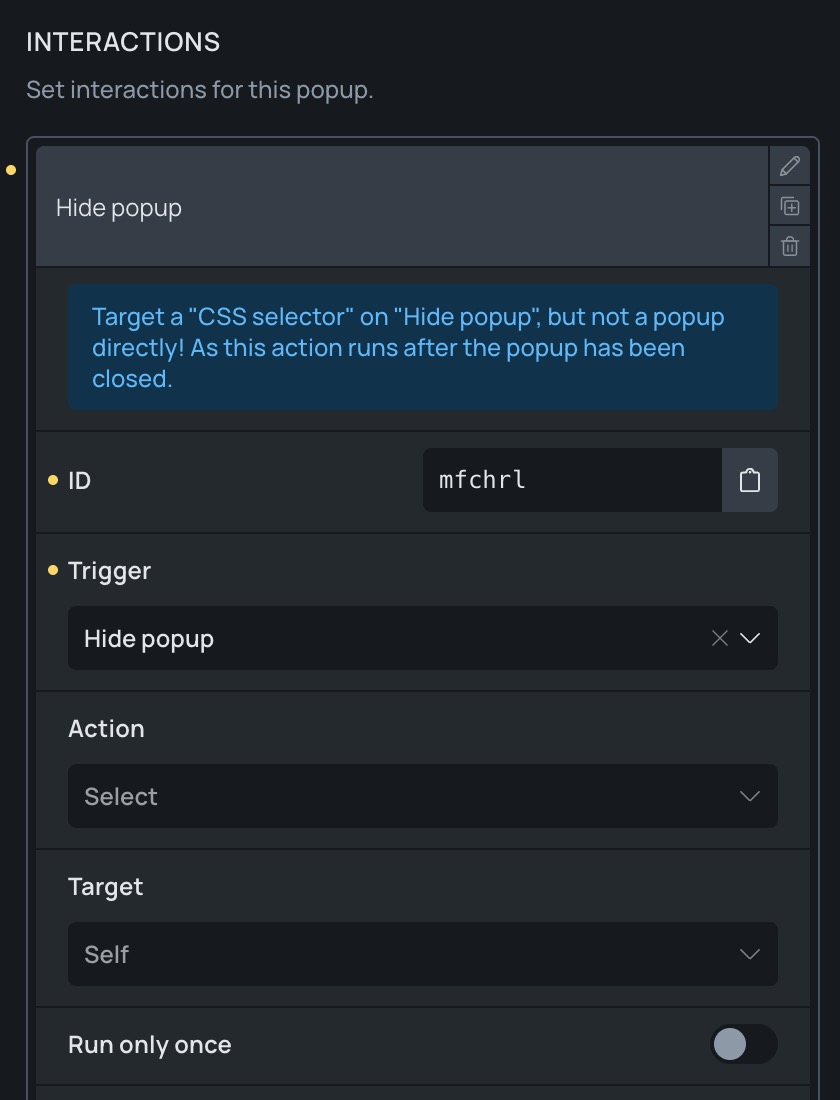
This fits! And now I feel stupid because I tried to set this up through the element that receives the click event (which obviously isn’t the popup itself). I found the “Interaction” section in “Manage (cogwheel icon)” → “Template Settings” → “Popup” → near the bottom, not via the usual “Interaction” Button. Now the list of triggers provides the “Hide Popup” and “Show Popup” options. (Writing this explicitly to make it easier for others to search for)
I will try to implement the behaviour and report if things actually work.