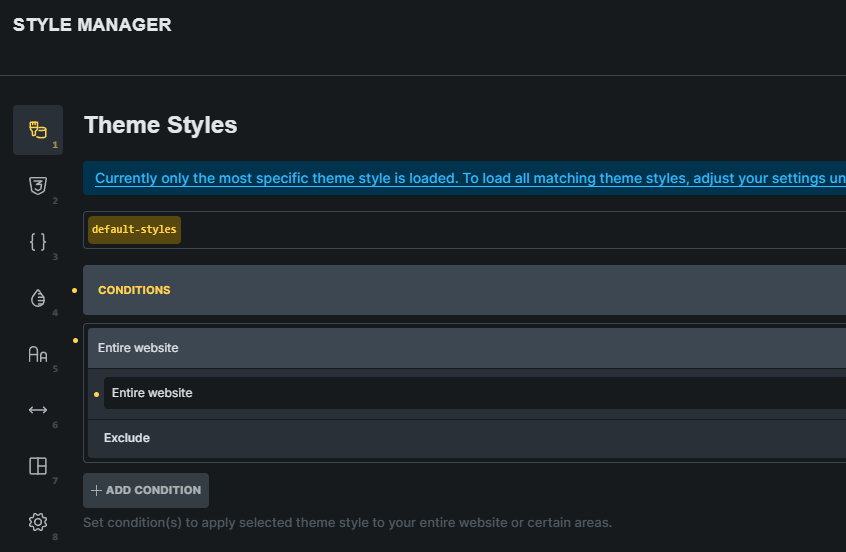
I am trying to wrap my head around the mental model for “Theme Styles” in Bricks, and I feel like I might be missing a key piece of logic regarding how they cascade or merge.
My Goal: I want to use a “Main” theme style to handle global basics (high-level elements applied to the whole site) and a “Secondary” theme style to handle specific overrides or fill in gaps for certain sections (e.g., specific H-tag sizes for a “Newsroom” section).
My Setup:
Main Theme: Assigned globally (All Pages). Contains base styling.
Secondary Theme: Assigned conditionally (or manually selected) for specific templates/pages. Contains specific overrides (e.g., Typography sizes).
Settings: I have adjusted the “Theme Styles: Loading Method” in settings to try and influence priority.
The Issue: Even when the Secondary theme is active, the “Main” theme settings seem to win every time. Instead of the Secondary theme layering on top of the Main theme (inheriting the base and overriding specific fields), the Main theme just dominates everything.
The Question: Does Bricks support a “Base + Override” model for Theme Styles? Or is the system designed such that if a Global theme is present, it effectively blocks a Secondary theme unless I manually assign the Main theme to every page individually?
I’m struggling to see the utility of multiple Theme Styles if they can’t effectively cascade. Has anyone successfully set up a “Global Base” + “Section Specific” style system?
Any insight into the intended logic here would be appreciated. Thanks.
Hi Edgar,
Choosing “load all matching theme styles” in the settings works fine on my end. I tested with different font sizes/colors for my headings, and a post type condition applied to my “secondary” theme style, so it applies only to this post type. The “primary” theme style is set to entire site.
Perhaps the conditions for your secondary theme style is wrong, and therefore doesn’t apply? Hard to guess without a concrete example..
This “set to entire site” clarification is helpful towards my thinking. Reason for my post: ChatGPT said “having entire site” selected would null secondary… this didn’t seem correct. I will check on my second styles when I get back to that. Thanks so much for the clarification. I will let you know if I run into anymore issues.
You shouldn’t believe everything AI tells you Sometimes the AI answers about Bricks are reasonably correct, but sometimes they are total—excuse my language—bullshit
So it’s great that you’re asking here and getting answers from humans (the only question is how much longer that will last)
I actually have found Ai really helpful learning bricks. I setup a simple local Ai that references the bricks documentation with GitHub - DigiSavvy-Inc/bricks-builder-docs and leveraging cloud LLMs. Between all those, it’s been a great professor. Obviously it’s not perfect.. but it makes things faster to search for than typical docs.
 Sometimes the AI answers about Bricks are reasonably correct, but sometimes they are total—excuse my language—bullshit