Change the background of an entire section based on the block inside it that is hovered

This is a nice effect and I am looking, hopefully, for a solution without programming, code snippets, etc. If possible, using plain element of a plugin, or even better, just Bricks.

I want to change the background of an entire section in the homepage, based on which of the blocks inside it that is hovered.

This is the case:

  • Website with WP + Bricks + ACF Pro + BricksForge + Bricks Extras + few other non-relevant to this case. May consider installing a new one if it gets the job done.
  • I have an ACF CPT (services) which among other fields has post_title, service_short_description (rich text field), service_banner_image (image field), home_page_featured (taxonomy field).
  • I defined a component for the Service card that includes the Service Name (post_title), the service_short_description, and an Icon linking to the post_url to use the Service Single Post template.
  • If homepage_featured = ‘yes’ for a Service, that Service Card will display in the section of the homepage, along with other featured services.
  • The Section in the homepage (flow: row) is populated by a query loop on Services of homepage_featured Services = ‘yes’. I expect to have 3-4 blocks (depending on the number of homepage_featured services marked with ‘yes’).
  • On page load, the background of the entire section will be the service_banner_image corresponding to the Service in the first block of the query loop.
  • When hovering the second featured Service, the background image of the entire section should change to the service_banner_image corresponding to the second service in the query loop, and so on.

Any thoughts? Is it possible?
Hi Oscar,
I can provide you with a static approach that may point you in the right direction.

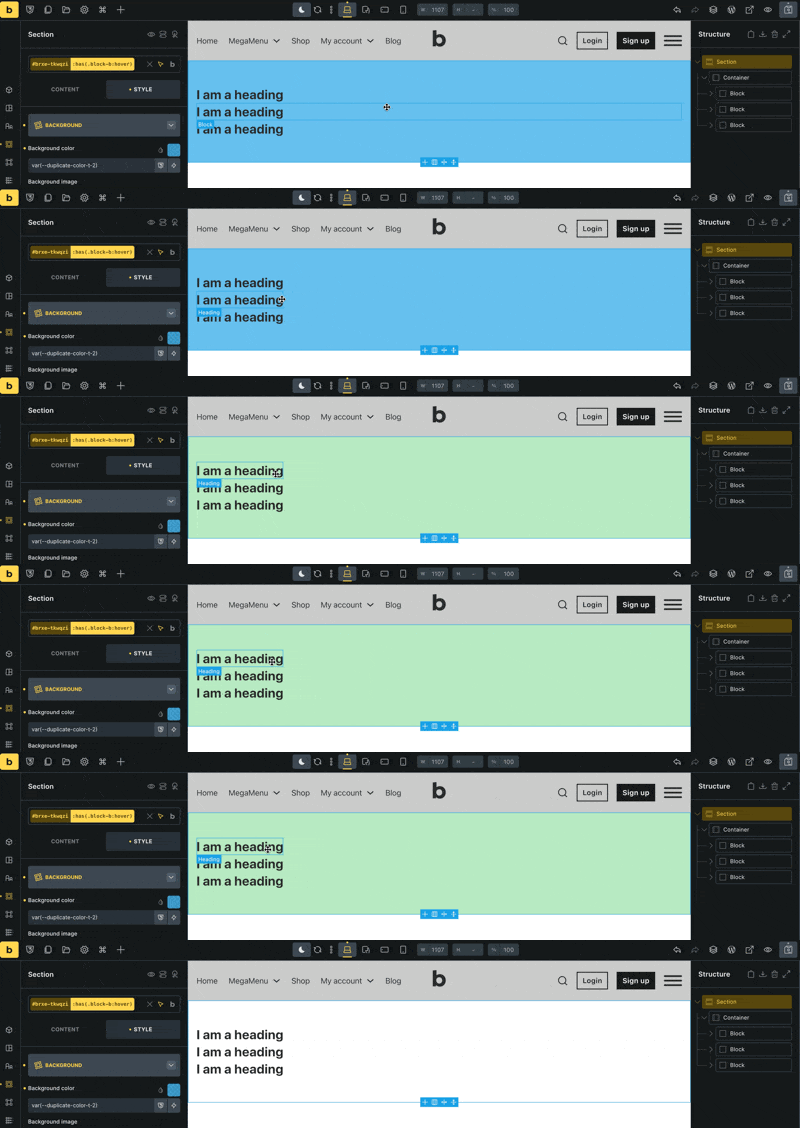
You could use a custom selector such as :has(.block-class:hover) on the section. In my example, each block has an individual class (.block-a, .block-b, 
) and I have created a custom selector on the section for each of these blocks.

CleanShot 2026-02-03 at 11.03.21

In a loop, it gets a little more complicated, of course, because you always have the same class on the block. Here, you could probably use the :nth-child selector like this, which targets the third block in your loop, for example.

:has(.brxe-block:nth-child(3):hover)

Static example:

{"content":[{"id":"ugvotv","name":"section","parent":0,"children":["aaexnt"],"settings":{},"selectors":[{"id":"itateq","selector":":has(.block-a:hover)","settings":{"_background":{"color":{"raw":"red"}}}},{"id":"ngpxfo","selector":":has(.block-b:hover)","settings":{"_background":{"color":{"raw":"yellow"}}}},{"id":"qoycnn","selector":":has(.block-c:hover)","settings":{"_background":{"color":{"raw":"green"}}}}]},{"id":"aaexnt","name":"container","parent":"ugvotv","children":["mivyon","fyzesk","apzdpu"],"settings":{}},{"id":"mivyon","name":"block","parent":"aaexnt","children":["jreozu"],"settings":{"_cssGlobalClasses":["hgfxpv"]}},{"id":"jreozu","name":"heading","parent":"mivyon","children":[],"settings":{"text":"I am a heading"}},{"id":"apzdpu","name":"block","parent":"aaexnt","children":["wwfxbr"],"settings":{"_cssGlobalClasses":["ehjdcv"]}},{"id":"wwfxbr","name":"heading","parent":"apzdpu","children":[],"settings":{"text":"I am a heading"}},{"id":"fyzesk","name":"block","parent":"aaexnt","children":["bgvrph"],"settings":{"_cssGlobalClasses":["jeeexm"]}},{"id":"bgvrph","name":"heading","parent":"fyzesk","children":[],"settings":{"text":"I am a heading"}}],"source":"bricksCopiedElements","sourceUrl":"https://brxdev.local","version":"2.1.4","globalClasses":[{"id":"hgfxpv","name":"block-a","settings":{},"_exists":false},{"id":"ehjdcv","name":"block-c","settings":{},"_exists":false},{"id":"jeeexm","name":"block-b","settings":{},"_exists":false}]}

@Timmse, thank you so much for your excellent approach. You are always very helpful. Thank you for what you do for the community. This approach works for static situations. My issue has several faces:

  1. I am totally allergic to coding, not only because, despite being a computer science engineer, last time I wrote code was back in the ‘80s
 but also because simply have NFI of coding. (Don get me wrong: NFI = No Freaking Idea). LOL :laughing:
  2. It may introduce limitations to the client, owner of the website, down the road, as they would perhaps need a more qualified developer to maintain the site, if I’m not available.
  3. This specific case is for a company that has several Services and depending on the time of the year, we want to feature different services on the homepage. They have about 18 different services and may want to feature 3-4 for a certain period of time, and then change them, so static will not work, to my understanding. Featuring a service is just a matter of toggling yes/no in homepage_featured field of the corresponding Service.
  4. All the information is being pulled from the Services CPT, so it dynamic content, and obviously, has to be done via a query loop.

I’ve played around with conditionals, interactions, and other things but cannot come up with a solution


Thank you again
 Let’s see if you, or someone else come up with a solution for dynamic content. I look forward to that. I insist on it because I think is is still a nice effect.

You’re welcome, that’s what I’m here for :slight_smile:

Actually, I already gave you the solution for your project with the static variant, which also works in a loop with a slight modification.

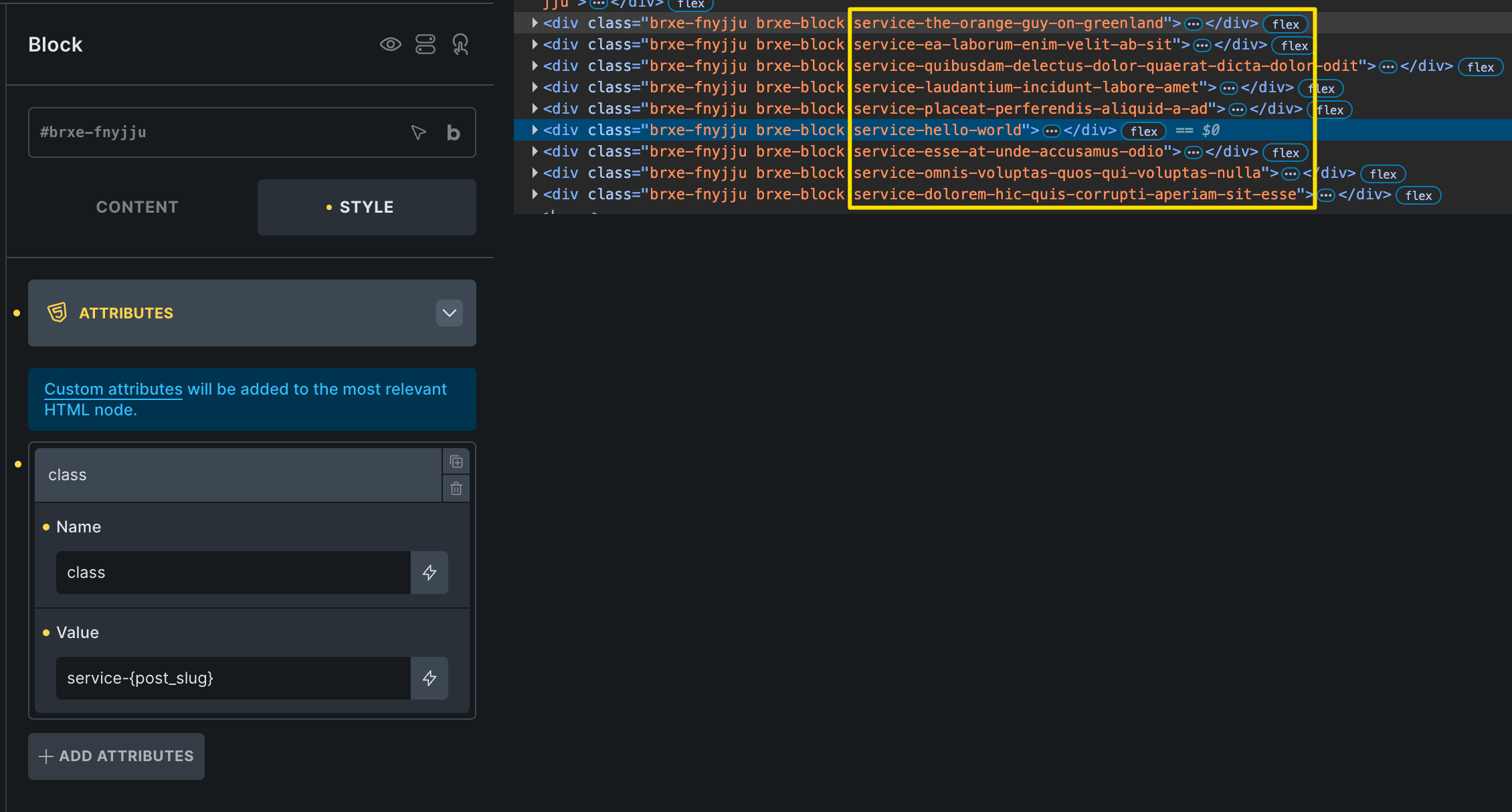
In my example, I assigned classes such as .block-a to -c to my blocks. You could give your service blocks a “dynamic” class via attribute, e.g., consisting of the {post_slug} of the service, and you could also prefix them with a static part, so that, for example, .service-webdesign is the result. Now you just have to create the :has selectors for all these classes on the section, set the background colors, and that’s it.

At the end of the day, remember that the basis of your service (building websites for clients) is one thing: code. Even if you create most of it in a “visual environment”, it results in code :smiley: That’s why it’s generally advisable to at least learn HTML and CSS, especially since it’s a far cry from “real” programming. It’s like learning vocabulary in a (simple) foreign language: the more vocabulary you know and the more often you speak the language, the better you will be at speaking and understanding it.

2 Likes