This release is all about working safely on live sites: save changes as drafts or site versions, share them with clients through review links, publish when you’re ready, and restore earlier versions of your global data. It also brings Structure panel search, global query filters with a new Geolocation filter, and a Repeater property for components.
You can download the 2.5-beta manually from your Bricks account at:
Disclaimer: This is a beta release meant for testing & providing feedback. Please don’t install it on production sites!
Full changelog:
Watch what’s new in Bricks 2.5:
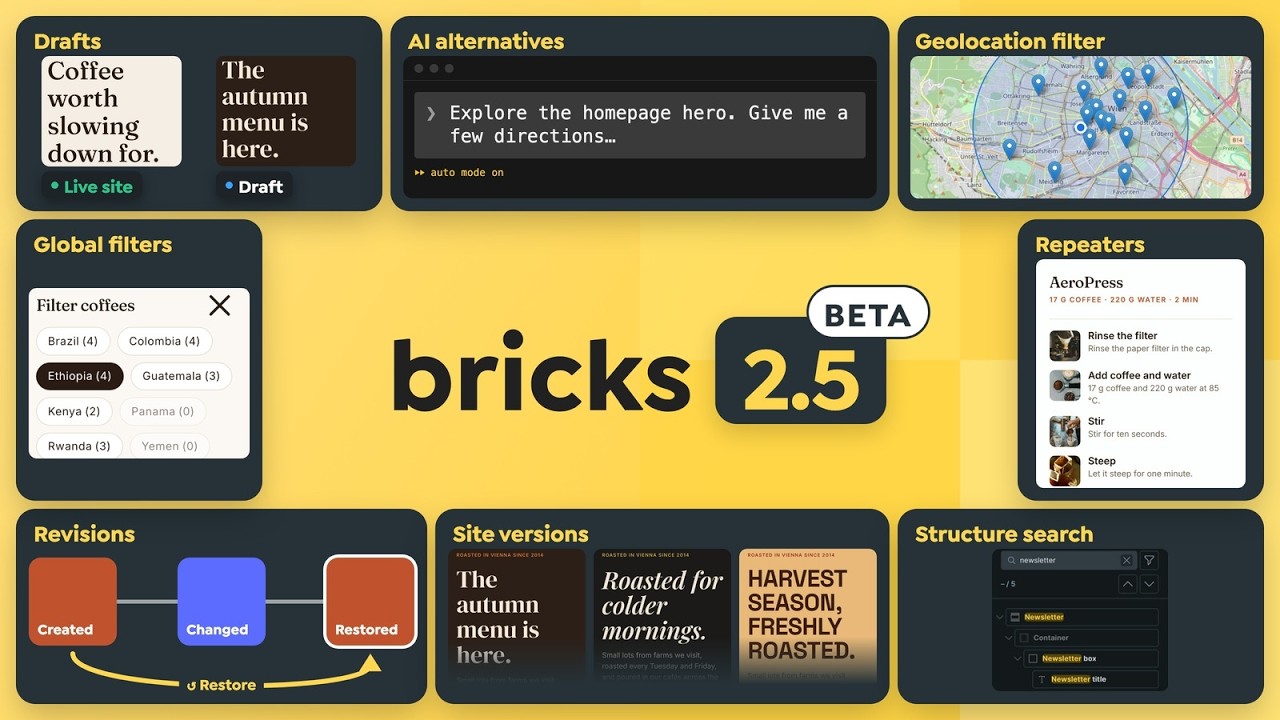
Here are the highlights 
 DRAFTS & SITE VERSIONS (experimental)
Save your work as a draft instead of publishing every change right away.
- Page drafts for changes to a single page
- Site versions for work across several pages and global styles, like a rebrand that updates your colors, fonts, header and pages at once
- Drafts include global classes, variables, color palettes, theme styles, components, fonts, icons and breakpoints
- Publish shows exactly what will change, resolves conflicts with the live site, and can be undone
- Compare with live, and explore design alternatives at desktop, tablet and mobile widths
- View-only review links for clients that expire after 1 to 30 days
Drafts are off by default. Enable them under Bricks > Settings > Builder > Drafts & site versions (staging sites only for now).
Documentation:
 GLOBAL DATA REVISIONS
Bricks now keeps a revision history for global classes, variables, color palettes, theme styles, components, global queries and global filters.
- Browse every version as a timeline with the old and new value of each setting
- Restore any version, or bring back deleted items
- Open revisions right from the Style manager, the class and variable editors, and the Browser
- Keeps the latest 20 versions of each item plus every version from the last 90 days
Saving global data is safer, too: conflict-safe saving is now always on, so edits from different Builder tabs merge instead of overwriting each other.
Documentation:
 STRUCTURE PANEL SEARCH & CLASS GENERATOR
Find any element in a large page in seconds.
- Search by label, element type, text content or element ID
- Prefixes for IDs (#), classes (.), attributes ([), HTML tags (<) and Dynamic Data tags ({)
- Filters for query loops, conditions, interactions, custom CSS and more
- Cmd/Ctrl + F to focus the search
Right-click an element and choose Generate classes to create global class names for it and its children from their labels, using BEM or another naming preset.
Documentation:
 UNDO/REDO HISTORY & KEYBOARD SHORTCUTS
Undo and redo now tell you what they did, highlight the element on the canvas, and let you jump back up to 10 steps at once from a dropdown. The History panel has been redesigned to match.
Keyboard shortcuts can now be remapped, disabled, reset, imported and exported, and shared with your team through Builder interface profiles.
Documentation:
 GLOBAL QUERY FILTERS & GEOLOCATION FILTER
Set up a filter once and reuse it everywhere, for example in a desktop sidebar and a mobile offcanvas. Manage all of them in the new Filter Manager.
The new Filter - Geolocation element adds radius searches:
- Use the visitor’s location or an address
- Choose a radius and sort results by distance
- Works with Google Maps and Leaflet maps
- Supports native coordinate fields, ACF Google Map and Meta Box map fields
Documentation:
 COMPONENTS: REPEATER PROPERTY & DYNAMIC DATA
Build FAQs, pricing tables and testimonials as components with the new Repeater property. Each instance can add, duplicate, reorder and remove rows.
- Use component properties as Dynamic Data with {prop.key}
- Create and connect properties from a component’s content in one step
- Global classes in style variants
- Categories and element type filters in the Component Manager
Documentation:
 NO LONGER EXPERIMENTAL
AI abilities and Components as blocks, both introduced in Bricks 2.4, are no longer experimental. Their settings, permissions and saved data stay the same.
Documentation:
 HEADS-UP: SEARCH ELEMENT
The Search element has new, separate controls for each button and updated default CSS. Existing settings are kept as fallbacks, but please check your Search elements after updating, especially in overlay mode.
Documentation:
 AND THERE’S MORE
- New Lottie element
- Background video settings per breakpoint
- Lazy loading for background images and videos
- Copy to clipboard interaction and repeating animations
- Form timepicker, field descriptions and auto-focus
- Inner content and cookie element conditions
- Slider auto-scroll and a Tabs accordion setting
- Footer reveal effect
- Leaflet Map support for Query and Sync Query
- Drag and drop image uploads
- Product price updates when selecting a WooCommerce variation
Explore the complete Bricks 2.5 (beta) release here: