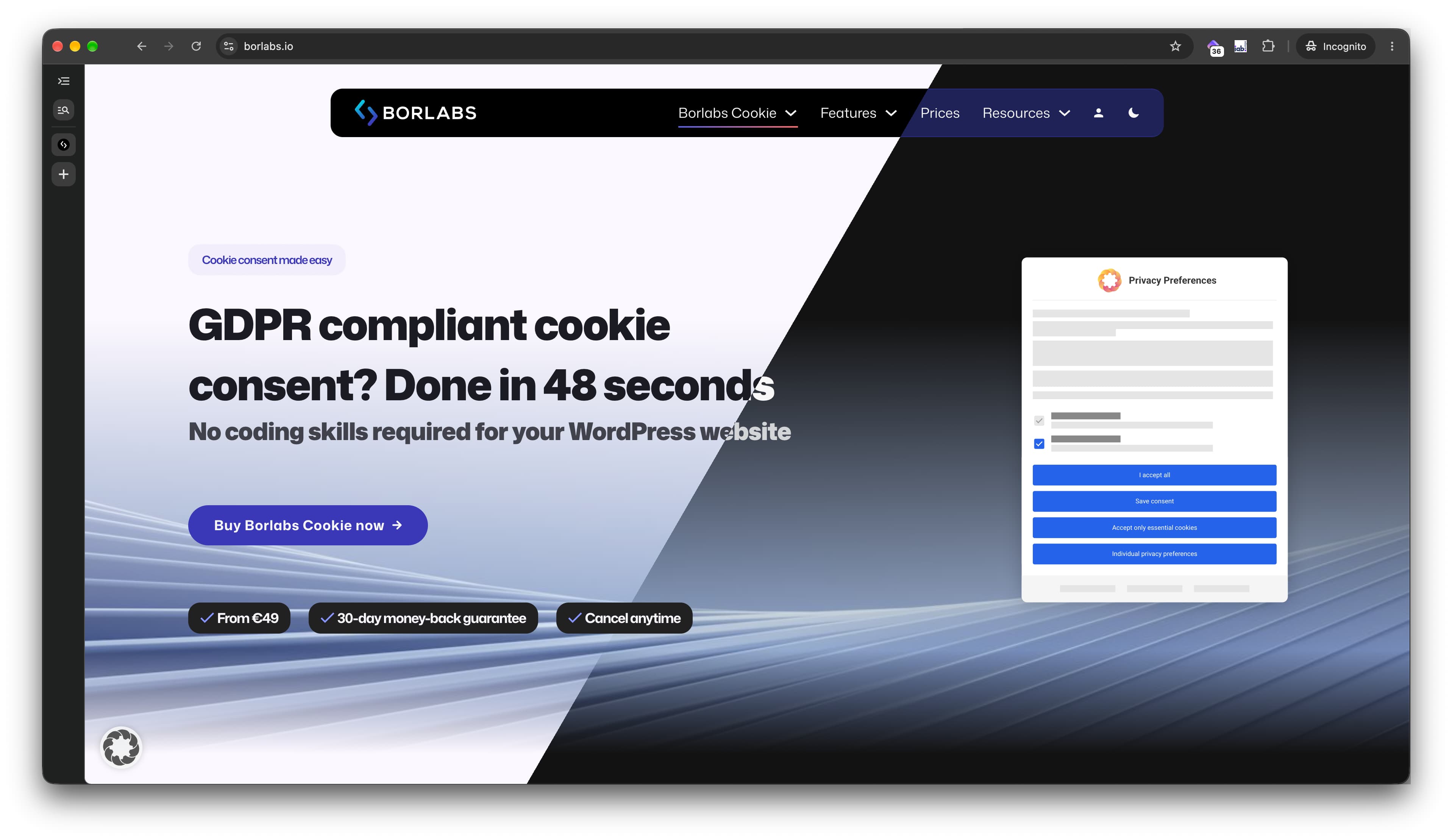
borlabs.io, rebuilt with Bricks and (almost) no extra plugins

After eight years on The7 + WPBakery, we’ve finally relaunched borlabs.io with Bricks, and boy, do I love this builder. :heart_eyes:

Our goal was simple: use as few third-party plugins as possible and rely on Bricks’ built-in features wherever we could. Here’s how it turned out.

Plugins

Besides Bricks, we only use:

  • ACF
  • Code Block Pro
  • MultilingualPress
  • WPForms
  • A few custom plugins that extend the ones above or connect to services we use

Components

We use 24 components across the site. We’d been looking for a feature like this in other builders for years, and Bricks was the only one that met our requirements. Components, the query loop builder and the ability to run PHP right inside the builder were exactly what we needed to build the site we had in mind.

Style Manager

We were lucky to start the project right as Bricks introduced the new Style Manager, and it shaped our entire setup:

  1. A brand palette with all of our CI colors.
  2. A design palette where every layer and element pulls its color from the brand palette, mostly using oklch to derive variations.

This made building the light and dark versions of the site incredibly efficient.

For our “Affiliate” and “Social Responsibility” pages, we added two small palettes with only 6–7 values each, introducing just two new colors per page.
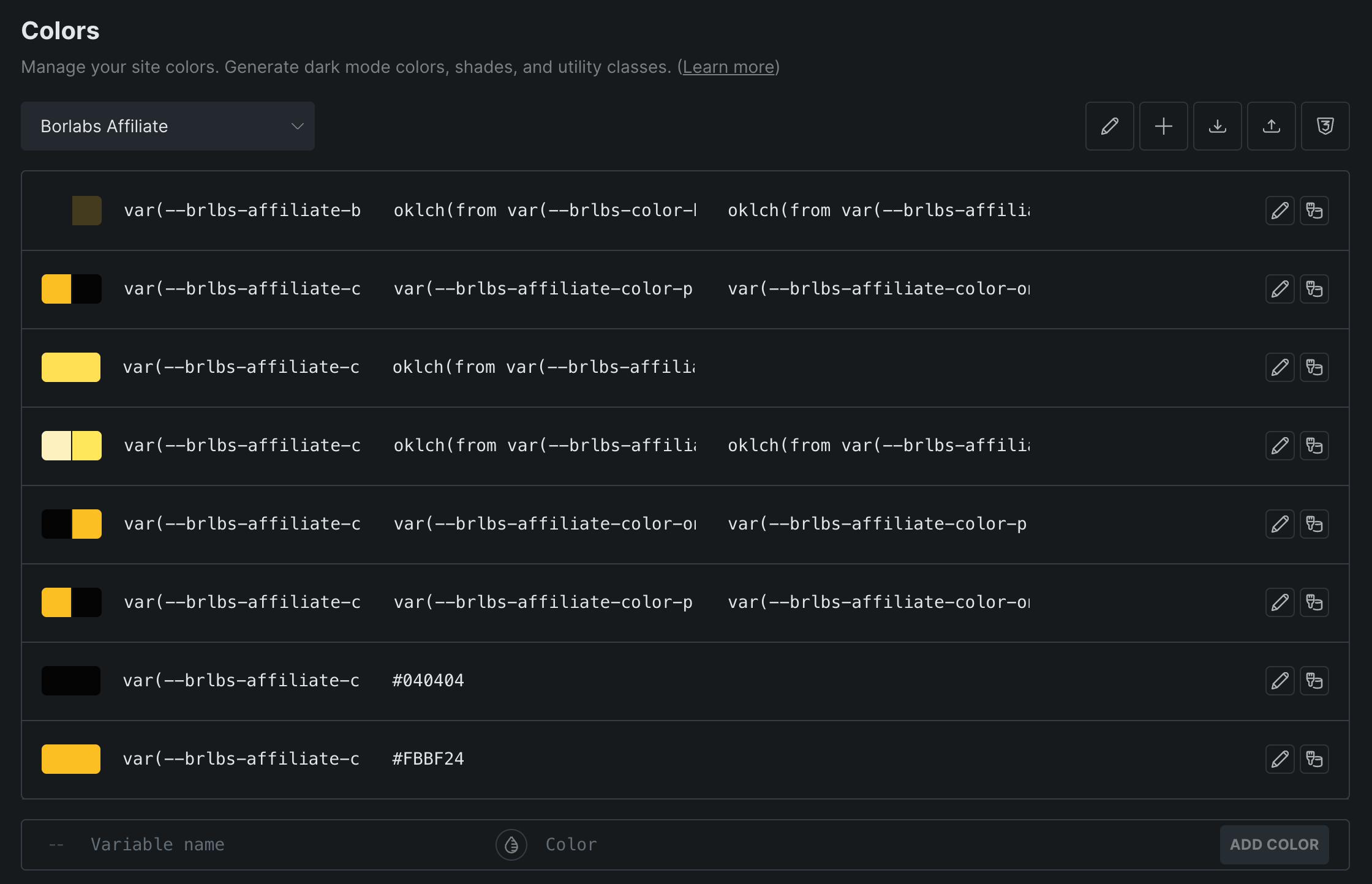
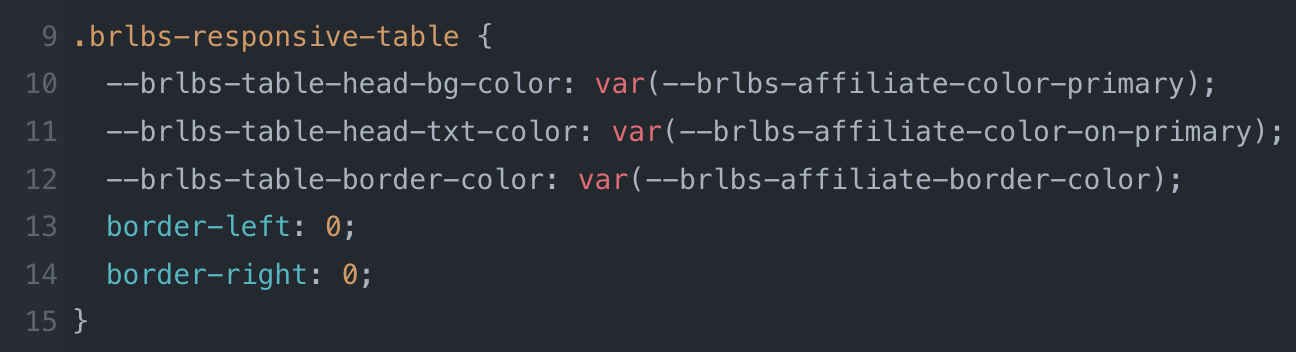
To restyle the tables on the affiliate page, for example, we simply override three variables from the design palette with values from the affiliate palette. That makes maintenance so much easier. Such an awesome feature!

Highlights

Most of the highlights below follow the same recipe: query loop + custom post type + custom fields, often with live search on top. It has quickly become our favorite way to build in Bricks.

Documentation

Our documentation is built with the query loop and live search. Every article is a custom post type entry, organized with taxonomies that can be hierarchical (e.g. Borlabs Cookie). When you open an article (e.g. Update Payment Method), a custom plugin pre-selects the matching topic and subtopic in our WPForms support form, so anyone who still needs help lands in the right place.

Integration Library

The library page is another query loop + live search combo. Each package is a custom post type entry, with custom fields holding details like its name, thumbnail URL and type (e.g. Content Blocker).

Changelog

The classic recipe once more, and I really love it. Our changelog design was shamelessly stolen from the Bricks changelog :smiley:

Pricing

The pricing page uses nestable tabs and components with slots.
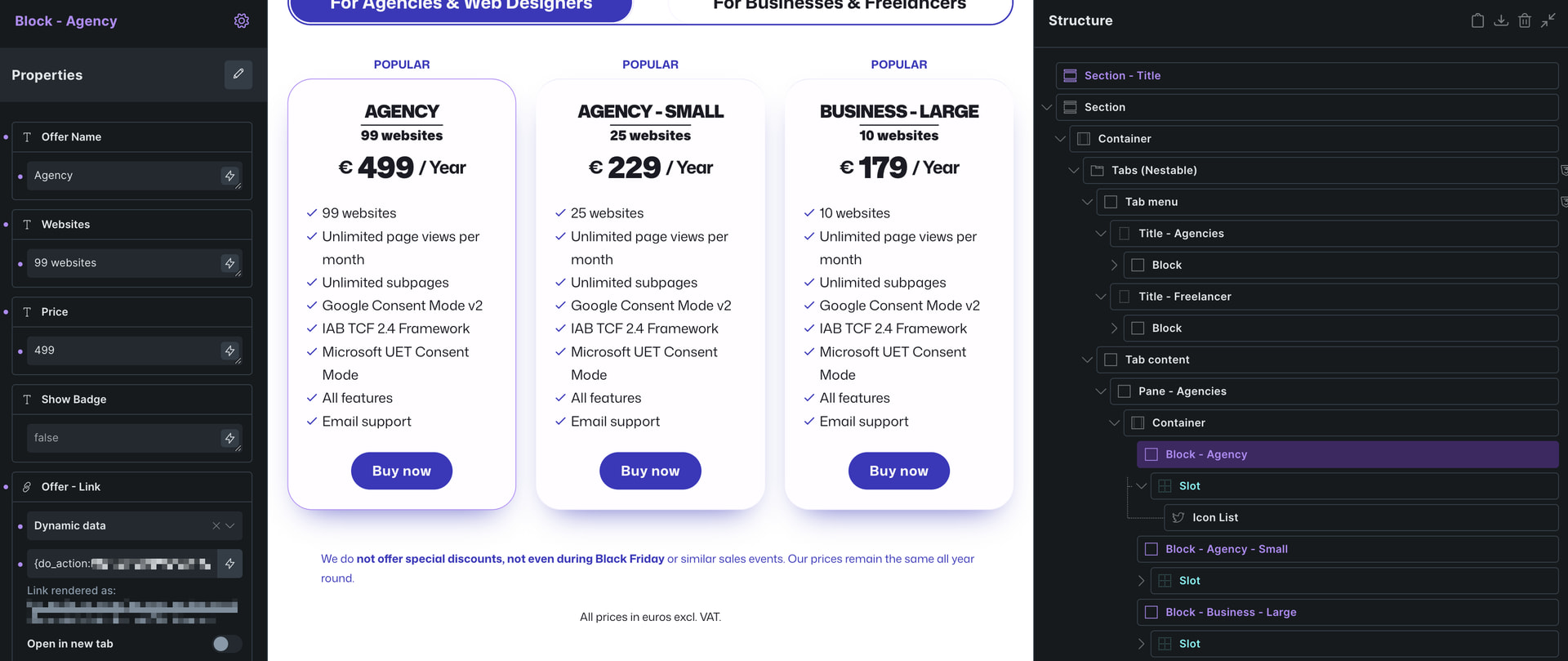
Each pricing card is a reusable component with properties for the license name (e.g. Agency) and the value that sets each license apart, in our case the number of websites. A “Show badge” toggle displays the “Popular” label above the card. The purchase link comes from a dynamic action that calls a filter hook, which returns the URL that opens the payment dialog.
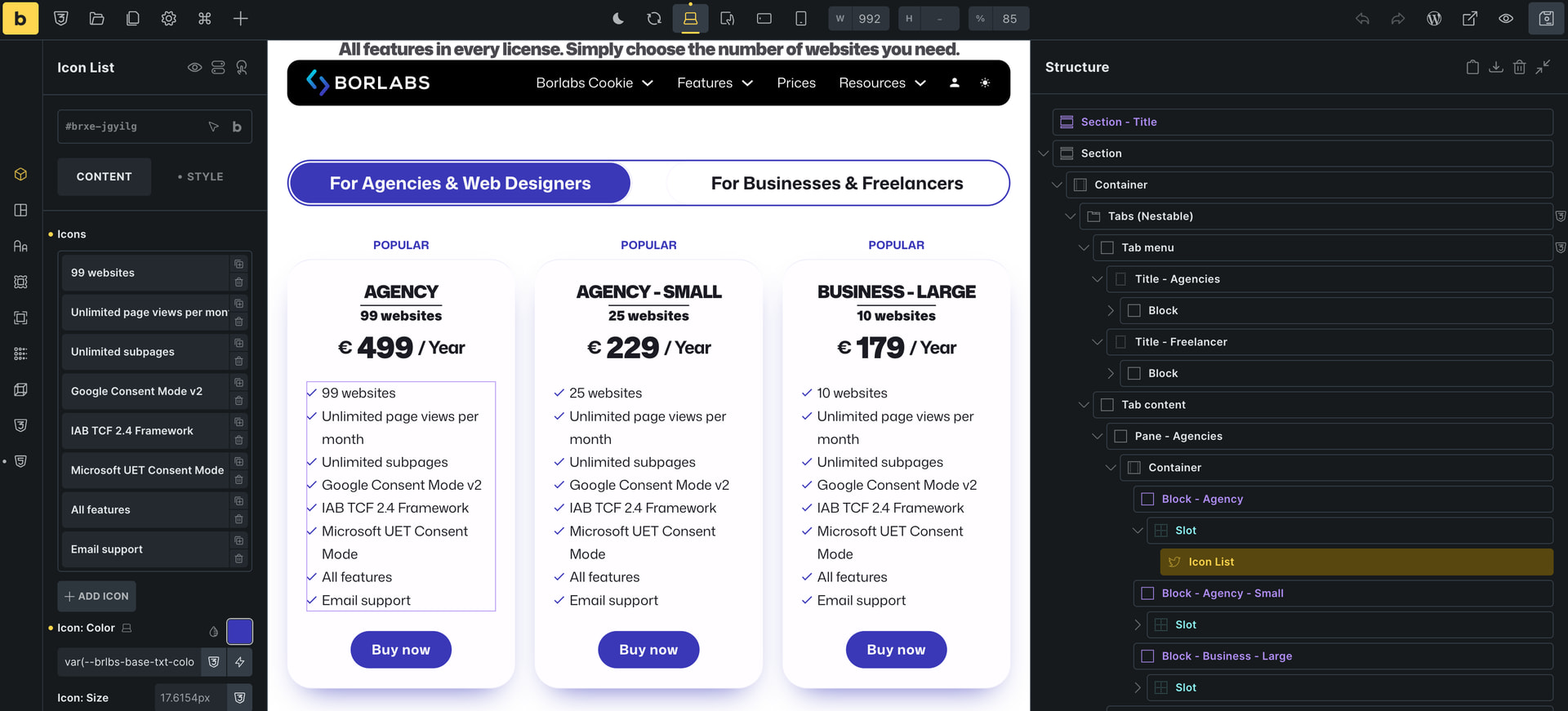
A slot lets us manage each license’s feature list individually. And the hover animations? Just a hover selector combined with Bricks’ transform setting.

Social Responsibility

Query loop, custom post type, custom fields: you know the drill by now. On our Social Responsibility page, the counter gets its target value from a do_action hook, and a small script uses BricksIntersect to wait until the counter has reached that value, then fires off some confetti. :tada:

Thank you

A huge thank you to the people behind Bricks! I really appreciate all the work you’ve put into this builder. And many thanks to the support team as well: your help was always fast, and reporting bugs was quick and hassle-free.

Check it out: https://borlabs.io/

8 Likes

Nice nice, prices: I think you must swap the name Agency-Small with Agency Large thought.

Our prices increase with the number of websites included. Since our customers read from left to right, it’s psychologically better to show the largest plan first, as its higher price serves as an anchor and makes the smaller plans feel like good value.

The prices are correct, but the subscription name does not correspond. Large is cheaper than Small…

Because it’s Business - Large and Agency - Small.

Major accessibility issues here. Impossible with a keyboard. The plugin itself is hostile to anyone without a mouse as the popup sends focus to the end of the document rather than the beginning, making the site essentially unusable. :roll_eyes: This site and the plugin’s implementation will not pass EAA.

If you’re referring to our product: Borlabs Cookie has been audited by Accessi and works with screen readers such as VoiceOver, including full keyboard navigation. I implemented the accessibility features myself and tested them personally. If you notice anything we may have missed, please don’t hesitate to contact us.

If it was audited properly, then either their recommendations were not followed, or they audited a different version of the site, because there are glaring, obvious problems. Get your money back if they did not flag the focus issue with the cookie popup or any of the focus state failures. Your site does not even pass WCAG A.

Thanks for raising this. We test our site against WCAG 2.1 AA and scored 100/100 in our latest GetWCAG scan: GetWCAG App

A second audit (WebYes) flagged two minor issues, one contrast ratio and one icon label, and we’re fixing both now. Automated tools don’t catch everything, so if you’ve run into a specific problem, please let us know which page and what happened, and we’ll look into it right away.

Dude- I already gave you two specific problems. Why ignore those?

I couldn’t reproduce these issues. The site worked as expected when I tested it with keyboard navigation and VoiceOver. Could you share more details, such as browser, OS, and steps to reproduce?

WCAG 2.4.7 Focus Visible (Level AA): Any keyboard-operable user interface component must have a mode of operation where the keyboard focus indicator is visible.

The site has no focus states for anything that I can see.

Criterion 2.4.3 (Focus Order): When a modal dialog or popup is dismissed/closed: Keyboard focus must return to the element that launched or triggered it (or a logical subsequent element if the design explicitly dictates it).

As already stated, returning focus to the end of the document when the cookie popup closes is a hostile design pattern.

You should really have someone actually use the website with adaptive technology and not only use tools and automated tests.

1 Like

Moin Ben,

congrats on the redesign!

Yes, your website is missing a visible focus indicator. If you like, you can use the code below in the global stylesheet. Since it uses black and white, it provides maximum contrast against any background color.

Great to hear you had so much fun using Bricks to rebuild your website. I totally agree, I also find myself constantly impressed by the possibilities and flexibility Bricks offers.

/* A11y Focus:Visible */

:focus-visible {
outline: 3px solid #000000 !important;
outline-offset: 2px !important;
box-shadow: 0 0 0 2px #ffffff !important;
}


/* Verhindert den Outline beim Klicken mit der Maus */

:focus:not(:focus-visible) {
outline: none !important;
}

Have an amazing day,

Patrick

1 Like

Thank you both for your feedback. I’ll look into this when I’m back from vacation.

Nice to see a well established WordPress Plugin provider such as yours switch to bricks!
Site looks great! :fire:

Best Regards!
Suat

1 Like