How can you set multiple images to rotate as the background of a section / container / block?
See if this helps:
Hi @holodyn, we have Background Slideshow feature in our plugin that you can check out - Background Slideshow for Bricks Builder - Max Addons for Bricks
Client asked for this today.
Curious if there is any thoughts from the Bricks team regarding adding this officially? It’s not a weird thing, and doing it “Bricksily” is of obvious interest here.
Also, perhaps we could identify a “best practice” tutorial for doing this with Bricks for now?
Has anyone successfully done this and was happy with how they did it (or at least, feels they did the best possible with what they had to work with)?
Thanks 
Sorry for the late reply on this. I came here looking for an answer and was disappointed to find a promo post for a paid plugin (no offense intended to the poster).
After a bit of research and some trial and error, I found a Bricks-native solution that does not require any custom CSS, no plugin, and no other BS. It is just pure, unadulterated Bricks Builder.
Create a Section
In the section, add a Container (wrapper)
In the Container add a Block
In the Block, add a Carousel and a Block
- The Carousel will serve as your slideshow
- The Block will serve as a container for your static elements
In the Block, add whatever elements you want to float on top of your slideshow / carousel
I have a Heading, Basic Text, and a block with 2 buttons. YMMV
This is what it looks like in the structure panel
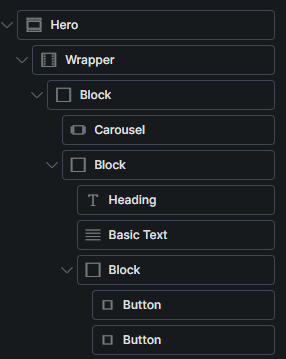
Section - no change
- Container (wrapper) :: Style > Layout > Padding 0px all sides; Sizing > Width: 100%
– Block :: Style > Layout > Positioning > Position: Relative; Style > Gradient / Overlay: Apply to: Overlay, type linear, color: black, opacity .3
— Carousel :: Add your slideshow images
— Block :: Style > Sizing > Width: 100%; Height: 100%; Positioning > Position: Absolute; Top/Bottom/Right/Left: 0; z-index: 99
The secret sauce here is the 2 blocks. The first block position is relative while the 2nd block position is absolute. This essentially moves the 2nd block inside the first block. The result of that is, your Carousel changes in the background of block 1, while your static elements sit on top of the slideshow in block 2.
I hope all that makes sense.
I am having a few issues with the Carousel on the mobile breakpoint. I may just hide it on mobile and call it done.
I hope this helps someone.