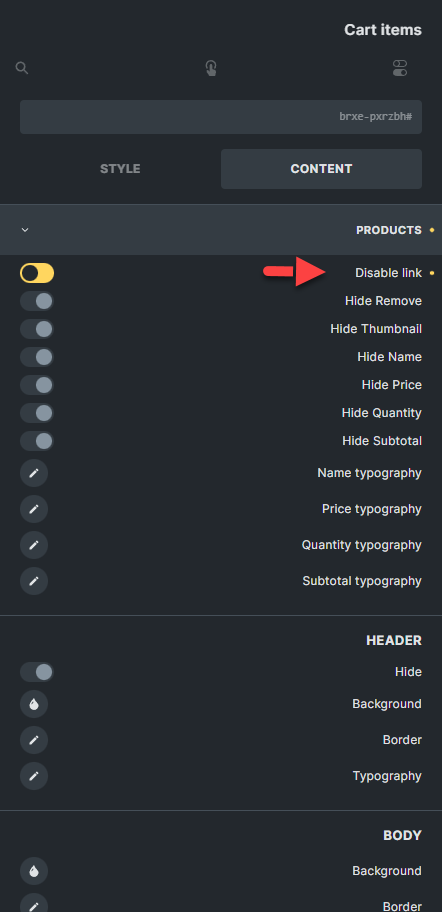
Add more Mini cart configurations ,like the Woocommerce Cart page

Hello
Hope you are well

Please more add Cart item configuration for th “Mini Cart” like the Woocommerce Cart page.

For example I want to disable links in mini cart but I can only do it for image , not the title.
Also If you have a solution for this please help me.

Kind Regards

5 Likes

I hope we will see this feature in future, like what BricksUltimate did before.
I think Bricks Needs more advances features in Woocommerce to becomes it one the more complete themes in the market for Woocommerce users. and them I’m sure Bricks can make more money with these new customers in future.

I pray for it :wink:

2 Likes

I am also looking for a way to deactivate the link. Have you found a solution?

Bumping this up, as I agree - it would be great to have more flexibility directly within the builder, like what they offer:

1 Like

Thanks @JakaBasej01.

@timmse and @staff is this on the roadmap?

Thanks
Matt

1 Like

At the moment, a Mini Cart Builder isn’t on our roadmap yet.

We’re currently focusing on improving WooCommerce with more advanced/modular Checkout elements first. Once that part is in place, we’ll revisit related features like the mini cart builder.

In the meantime, feel free to upvote and follow the idea here so we can better gauge interest:
https://bricksbuilder.io/ideas/#20116

Regards,
Jenn

2 Likes

Thanks for the update @itchycode !

I have upvoted the idea here - https://bricksbuilder.io/ideas/#20116

We’ve addressed this in Bricks 2.4-beta (beta release), now available for manual download from your Bricks account.

Please read the changelog entry before testing, and let us know if you experience any issues. Note: beta builds are not recommended for production sites.