Hello @timmse, Any news on this? Would love to have that file for bricks-frontend-inline-inline-css
1 Like
Any news with 1.12?
Thank you
I can’t believe it’s March, 2025 and this is still not addressed! styles for all custom classes are loaded inline in the head still, while external style sheets are being generated but only contain styles for Bricks classes only, not the ones we add. Even the old oxygen builder loads all styles of custom classes in a cached external stylesheet!
Checking on this issue as it is becoming a problem on a few of our clients sites.
1 Like
what’s worse is as I’m adding custom classes to elements and styling them in the builder, some of them are being printed twice and some even duplicated 3 times in the inline css! I bet if you check thoroughly you’ll find styles (like the whole class and its styles) printed more than once within the inline css under “bricks-frontend-inline-inline-css”. I had to remove these classes altogether in the builder and even delete them permanently from trash then add them again along with the styles to get rid of the duplicates!
I hope bricks team looks into this and fixes asap @timmse 
Hi @blue,
Please create a report that includes reproducible steps in the bugs category, as I don’t know how to create the duplicates you mentioned.
I hadn’t fully read this thread yesterday. I contacted the Bricks support team yesterday regarding the same issue I’m experiencing, and they directed me here for updates.
Unfortunately, I encounter the same problem. In my case, approximately 550KB of CSS is being inlined. This occurred because I heavily utilized custom CSS via WPCodebox, and I was not aware of this bug.
As @blue mentioned, many classes and their styles are repeated more than seven times across my website.
I sincerely hope the Bricks team will release a solution soon.
1 Like
Unfortunately, he did not create a bug report, so we are still unable to reproduce the problem. Please show us how to reproduce the issue.
Hi @timmse
I yesterday sent an email to Brick’s help@ address, and Stefan redirected me here.
I’ve created an 8-minute video that thoroughly walks through the issue. If that’s not sufficient, I’m happy to share access to the test domain.
Please message me here or reply to the support email if you need more details.
Well, I am Stefan 
There were/are no “duplicated” classes in your video/your website. I just rechecked your styles, and still: no duplicates.
If you search for “kc-top-menu-header” (like in your video), there will be ~85 results, since you have 85 classes in total, including all the “__element” classes of the “kc-top-menu-header” block class. To double-check, I provided ChatGPT with your styles:
There are no duplicated style declarations within the provided CSS. Each selector does not repeat any identical property-value pair within its own scope.
Oh, hi @timmse aka Stefan 
Sweet, I sent you a bit more info via email thread.
To the public, I don’t see this issue on my Live website and only the Local version prints CSS at such crazy level. And there are a bit different in the dependencies on how the CSS is handled, but no major changes are being made.
I will wait for his reply here or via email.
Hi there, I’ve been following this thread for a while now.
is there an estimated time to when this can be fixed? it’s been almost three years.
1 Like
We are near 2026 and still the same… elementor v4 do this. hope bricks will do soon
1 Like
I am new to Bricks, enjoying building my first website in Bricks. I just realised that the global classes are loaded inline rather than an external css file. Any update on a timeline for this? Thank you.
You can read about it here: Asset Loading Optimization – Bricks Academy
Thank you, but global classes are still inline?
They shouldn’t be. If you set the CSS Loading Method to External and then Regenerate the CSS you will see the inline css striped and added to a file.
Here is a video here showing the inline and then the external css files: Watch 2026-05-12 15-39-59 | Streamable
Thanks Shingen for replying, really appreciated. I notice in your example though, they were all styled on the ID level (not classes). If you create global classes, i think you will find your styles are in style id=‘bricks-frontend-inline-inline-css’ rather than an external stylesheet. (unless i am missing something?) Let me know if that is the case with yours when you create global classes. Thanks
No problem. I have a mix of both ID level and Class level. In my example I am not using any components just as an fyi. But It depends on the pages, as any page that uses a query uses class styling (I believe that test site has about 6-7 different query loops).
EDIT: I just tested it on a live site and not a local development and yes, you are correct it still does hold it as inline. So not sure why it doesn’t do that on local dev – but either way, it seems like a bug (Also weird why it is calling it -inline-inline.css).
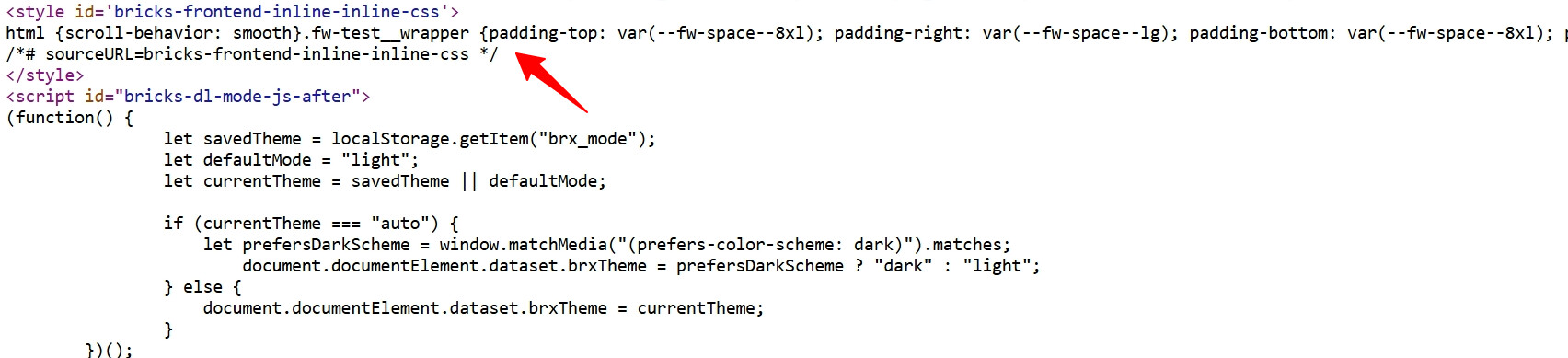
Yes, thanks for confirming. Hopefully it’s something they will be able to do in the near future as performance is a strong selling point of Bricks and to be able to optimise and cache the css would be my preference than to having inline styles. It seems they are going in the right direction with the latest improvements. Thank you
1 Like