the url changes adding the filters query strings but the results are empty, apparently the url is not realoaded after hitting the submit button but if you hit the url manually again for example
that was the reason i added this javascript to force the reload once you click on the submit button or any pagination element
I couldn’t find any way to make this search functionalitu to work while also maintaining pagination, so i involved query_vars and run filters as described in my php code
document.addEventListener('DOMContentLoaded', function () {
    const searchButton = document.querySelector('#brxe-ubgtqj'); // Botón de búsqueda
    const paginationLinks = document.querySelectorAll('.page-numbers a[data-ajax-pagination="1"]');

    if (searchButton) {
        searchButton.addEventListener('click', function () {
            setTimeout(() => {
                const currentUrl = new URL(window.location.href);
                const currentParams = currentUrl.search;

                if (currentParams && currentParams.length > 0) {
                    // Revisamos si en el pathname existe /page/X/
                    let pathname = currentUrl.pathname;
                    // Remover la sección /page/X/ si existe. Ej: /test-filters/page/2/ => /test-filters/
                    pathname = pathname.replace(/\/page\/\d+\//, '/');

                    // Reconstruimos la URL sin la sección /page/X/
                    const newUrl = currentUrl.origin + pathname + currentParams;
                    window.location.href = newUrl;
                }
            }, 10); // Ajusta este tiempo si es necesario
        });
    }

    // Comportamiento para enlaces de paginación (opcional, como antes)
    paginationLinks.forEach(link => {
        link.addEventListener('click', function (e) {
            e.preventDefault();
            setTimeout(() => {
                const newUrl = this.href;
                const newUrlParams = new URL(newUrl).search;

                if (newUrlParams && newUrlParams.length > 0) {
                    window.location.href = newUrl;
                } else {
                    window.location.href = newUrl;
                }
            }, 10);
        });
    });
});
Kindly create a new thread for your issue so we can check if this is a new bug. (Best send us email with admin credentials + the new forum thread URL as reference)
I will… Unfortunately the other client provider has been trash talking us and the client cancelled the project with us, that’s why i moved to another url.
I’ll try to wrap it for testing on the new url, the catalogue had 30k references and i’ve deleted most of the site as it was taking lot of database and hardrive space
Hello! I am encountering the same issue on several projects. I am on the latest main branch of Brcks, 2.0+
If I filter by an attribute, the product list does change, but only on the first page. Pagination remains, and immediately resets the filters for some reason, even if the url params remain untouched.
@itchycode I think there must be a regression on this because I’m seeing odd behavior in the latest version.
If I have 5 pages of posts and I go to page 5, then I click a filter that only returns a few results, the pagination still shows 5 pages and page 5 being the active one.
This is obviously wrong, but let’s say a filter returns enough results so that those results should be paginated, I would want that to be the case and reset the pagination to reflect the filtering.
I’m using the normal loop on standard WP posts, with normal pagination and filter elements. Everything is out of the box.
Your website behaviour is abnormal based on your description.
When I navigate to page 5, then click a filter, the page should be reset to page 1 (actually, the page parameter will be removed) and at the same time filter option applied.
You should first check if any other plugins are causing the issue. If the issue persists, please create a separate thread for this and provide us the link to that page.
So what the URL does is when I click on page 3, the URL will change to “/blog/page/3/”.
Then I click a filter and the URL changes to “/blog/page/3/?brx_bonqcm=some-filter”
The filters are based on the blog categories.
It’s using Filter - Radio in button mode. Along with standard pagination element.
Since I’m using ACSS/Frames, the query was called “Article Card Alpha”, if that matters, and both the filter element and pagination element reference that.
If I’m on the filtered URL and click back to page 1 or 2, the filter part of the URL goes away but the page changes and it goes back to the full listing without the filter.
So there you go, clicking the page number removes the filter, but clicking a filter keeps the /page/2 URL segments.
What could I try?
Active plugins are:
Column 1
Column 2
Advanced Custom Fields PRO
Version 6.6.2 by WP Engine | Auto-updates enabled
Automatic.css
Version 3.3.5 by Kevin Geary, Matteo Greco | Auto-updates enabled
Bricksforge
Version 3.1.6 by Bricksforge | Auto-updates enabled
FluentSMTP
Version 2.2.92 by FluentSMTP & WPManageNinja Team | Auto-updates enabled
Frames
Version 1.5.11 by Kevin Geary, Matteo Greco | Auto-updates enabled
LiteSpeed Cache
Version 7.6.2 by LiteSpeed Technologies | Auto-updates enabled
LoginPress
Version 6.0.0 by LoginPress | Auto-updates enabled
LoginPress Pro
Version 6.0.0 by WPBrigade | Auto-updates enabled
ShortPixel Image Optimizer
Version 6.3.5 by ShortPixel - Convert WebP/AVIF & Optimize Images | Auto-updates enabled
Solid Security Pro
Version 8.6.3 by SolidWP | Auto-updates enabled
UpdraftPlus - Backup/Restore
Version 2.25.8.26 by TeamUpdraft, DavidAnderson | Auto-updates enabled
WPCodeBox 2
Version 1.2.1 by WPCodeBox | Auto-updates disabled
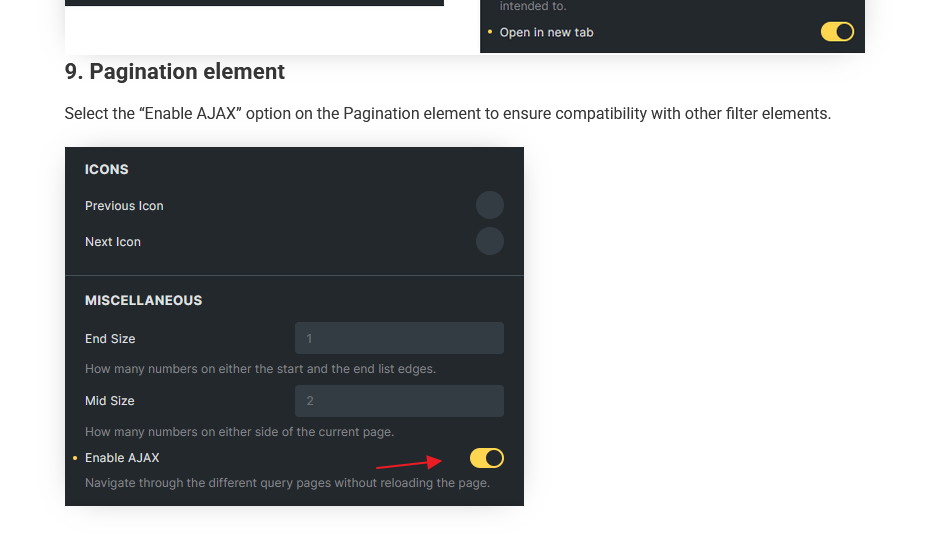
Correct, the ajax option wasn’t on, and that helped!
Can you explain why? I mean is it only to do with using filters at the same time or do we simply need to enable this every time pagination is used? Why would we want ajax off?