Hi,
I’m trying to find a solution for the following
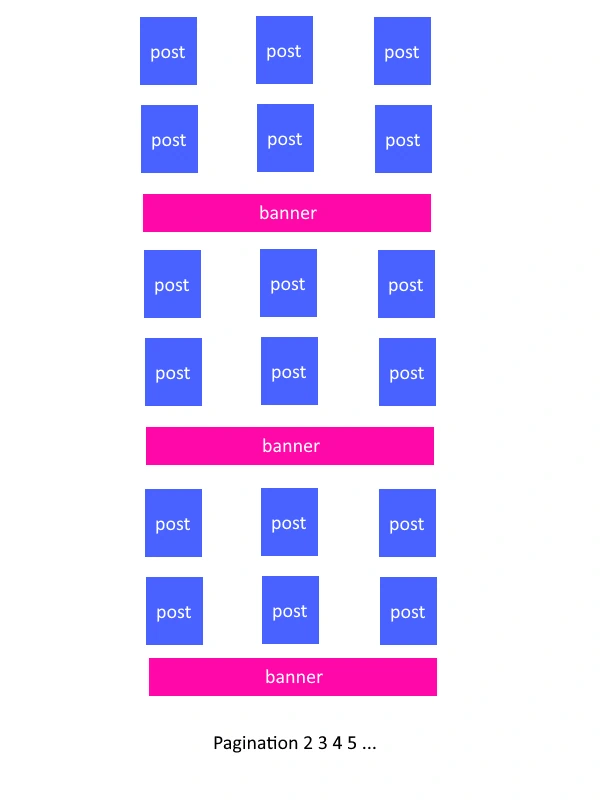
Wanted result: page that lists 24 posts of CPT in 3 columns, after every 6th post, should be a horizontal banner using width of 3 columns (turning 3 columns into 1) , but with pagination, so posts 25-48 are on page two, etc… (see sketch)
I thought of two solution paths
1)Multiple query loops on one page for same CPT using offset
3x query loops with a banner html after each one
Problem: this works great on first page, but some posts are repeated on page 2, 3, …
On page 2, posts 7-12 are repeated in the 1st query loop, …
If this is your only problem with that solution and you’re using CSS grid (which you should for such a layout) you can easily stretch the banners to take up a full row by using some custom CSS on the query loop item:
I’d avoid using multiple query loops with manual offsets, as pagination can easily cause duplicated or skipped posts. A better approach would be to use a single query loop and insert the banner after every sixth post, then style the banner to span the full grid width using grid-column: 1 / -1. You’ll also need to make sure the pagination is handled by the main query so each page loads the correct 24 posts. This should keep the layout consistent across pages. If you’re using Bricks, you may need a small PHP or CSS customization to get the banner and pagination working together properly.
Yes, the pagination creates another problem, the count doesn’t reset on the following pages, so on page two the banner will show on first place instead of 7th
@Nick100, I think the remaining problem is that the banner is being treated as one of the query results, rather than as an extra element between results.
That explains both symptoms: the seventh post gets replaced, and the position becomes awkward when pagination advances.
I’d keep a single Query Loop set to 24 posts per page and leave the actual post query untouched.
Bricks has a bricks/frontend/render_loop filter that lets you modify the HTML produced for each loop item. In principle, you could use it to append a separate banner element after every sixth rendered post.
Then apply grid-column: 1 / -1 to .loop-banner, assuming its parent is your three-column grid.
The important distinction is that the query still returns 24 actual posts. The banners are inserted into the rendered markup afterward, so they don’t consume a post slot or change the pagination offsets.
The counter above is scoped to the loop element and should start fresh on a new page request. I’d still test it with your specific pagination setup, especially if you’re using AJAX pagination, since I haven’t tested this snippet in your project.
Thanks @Mrlaura Does this work for you, I can’t seem to get it to work. Tried to make it work with aid of AI. Then I tried it on a fresh install, but doesn’t work there either.
 Glad I could help.